


You can automate appointment scheduling with AI by connecting an online booking page to your calendar, adding an AI assistant to answer questions and send reminders, and letting an automation tool update your CRM. Done well, it removes the email ping-pong, cuts no-shows and gives you back hours every week. This guide shows you exactly how to set it up.
What Is AI Appointment Scheduling and Why Does It Matter?
AI appointment scheduling is a simple system that handles the whole booking journey for you, from the first “Can we talk?” to the reminder the day before. It is not one magic tool. It is three layers working together.
The first layer is the booking layer: a scheduling page that reads your calendar and only offers times you are actually free. The second is the communication layer: an AI assistant that answers questions, sends confirmations and reminders, and handles reschedules. The third is the data layer: automations that save each booking to your CRM, spreadsheet or invoicing tool.
Why does this matter? Because scheduling is one of the most repetitive tasks in any service business. Coaches, consultants, freelancers, clinics, salons, agencies and small teams all lose time to it, and most never track how much.
Automation is also a competitive advantage. A lead who can book instantly at 10 p.m. will often choose you over a competitor who replies tomorrow morning.
If you already use tools like Zapier or n8n for other workflows, scheduling is one of the easiest and fastest wins to add. If you are just getting started, our guide on how to use Zapier and AI to save 20 hours of work every week is a good companion read.
The Hidden Cost of Back-and-Forth Scheduling
Most people underestimate what manual scheduling costs. A single meeting often takes four or more messages to settle: “Are you free Tuesday?”, “Not then, what about Thursday?”, “Which time zone?” and a final confirmation.
Let’s do the math. If you book 15 calls a week and spend five minutes on each, that is 75 minutes weekly, or more than 60 hours a year spent only on finding a time. And that is before you count rescheduling.
Then there are no-shows. Imagine your average appointment is worth $100 and two people miss their slot every week. That is $200 a week, or over $10,000 a year, in lost revenue and wasted prep time.
Slow replies cost you too. Leads who have to wait for a human to answer cool off quickly. Some book with someone else, and you never find out they were interested.
Finally, manual scheduling invites mistakes: double bookings, wrong time zones, forgotten follow-ups and details that never make it into your CRM. Automation removes most of these errors because the system follows the same rules every time.
What AI Can Automate (and What It Shouldn’t)
AI is excellent at the predictable parts of scheduling. It is not a replacement for your judgment on sensitive or high-stakes situations. Knowing the difference keeps your automation helpful instead of risky.
Tasks AI handles well:
- Answering common questions about services, prices, location and preparation before someone books.
- Qualifying leads with a few intake questions, so you only meet people who fit your offer.
- Suggesting and confirming times based on your real availability and the person’s time zone.
- Routing bookings to the right service, team member or calendar.
- Sending confirmations and reminders by email, SMS or WhatsApp.
- Handling reschedules and cancellations without your involvement.
- Summarizing intake forms so you walk into the appointment prepared.
- Following up after no-shows with a friendly message and a new booking link.
Tasks that still need a human:
- Medical, legal or financial advice. An assistant can book the visit, but it should never give professional guidance.
- Complex or high-value bookings, such as custom projects or large contracts, where a quick personal reply builds trust.
- Urgent situations and complaints. Give people a clear way to reach a real person.
- Sensitive personal data. If you handle health or other regulated information, check the privacy terms of every tool and your local rules (such as GDPR or HIPAA) before connecting it.
A good rule of thumb: let AI handle logistics, and keep humans for relationships and decisions.
How to Automate Appointment Scheduling With AI, Step by Step
You don’t need to be technical, and you don’t need to build everything in one afternoon. Start with the booking page, then add reminders, then add AI. Each layer improves the one before it.
The table below shows the main building blocks and some popular tools for each. You only need one tool per layer, and many have free plans, though features and pricing change, so check current options before you commit.
| Layer | What it does | Example tools | Best for |
|---|---|---|---|
| Booking | Shows your real availability and lets people book | Calendly, Cal.com, Acuity, Google Calendar booking pages | Everyone, as the starting point |
| Automation | Connects apps and triggers actions | Zapier, Make, n8n | Moving data between tools without code |
| AI assistant | Answers questions, writes messages, qualifies leads | ChatGPT, Claude, no-code chatbot builders | Replacing repetitive replies |
| Messaging | Delivers confirmations and reminders | Email, SMS services, WhatsApp Business | Reducing no-shows |
| CRM or database | Stores contacts, notes and booking history | HubSpot, Airtable, Notion, Google Sheets | Tracking leads and follow-ups |
The takeaway: start with the simplest tool in each layer and upgrade only when you outgrow it. A free booking page plus a basic automation is enough to see results in the first week.
Follow these steps to build your system:
- Map your current process. Write down every step from “someone asks to meet” to “the appointment ends.” Circle the steps you repeat most often. These are your best automation targets.
- Define your appointment types. List each service, its length, price, buffer time and any preparation needed. Clear rules make the booking page and the AI far more accurate.
- Set up your booking page. Connect it to your calendar, set your working hours, add buffers between meetings and limit how far ahead people can book. Turn on automatic time-zone detection.
- Add a short intake form. Ask only what you really need: name, email, what they want help with and one qualifying question. Long forms reduce bookings.
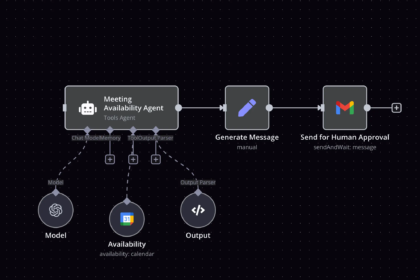
- Connect automation. In Zapier, Make or n8n, create a workflow that fires whenever a booking is created, changed or canceled. Send the details to your CRM or spreadsheet so nothing is entered by hand.
- Add the AI layer. Use an AI model to write personalized confirmation messages, summarize the intake form for you and draft replies to common questions. Give it your services, policies and tone of voice as instructions.
- Build your reminder sequence. Send a confirmation immediately, a reminder two days before, another one day before and a final one a couple of hours before. Include a one-click reschedule link in each.
- Test, then launch. Book yourself as a fake client, reschedule, cancel and miss an appointment on purpose. Check that every message, calendar entry and CRM record is correct before going public.
Once the basics run smoothly, you can make the system smarter without making it complicated.
A simple workflow you can copy:
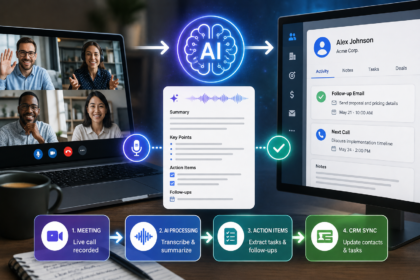
- A visitor books through your scheduling page.
- The automation tool creates or updates the contact in your CRM.
- The AI summarizes the intake answers and adds the summary to the calendar event.
- A confirmation email goes out immediately, with preparation instructions.
- Reminders go out on your chosen schedule.
- After the appointment, a thank-you message asks for feedback or a review.
- If the person doesn’t show up, a gentle “We missed you, here’s a new time” message is sent automatically.
This single workflow covers booking, preparation, attendance and follow-up. It is also the natural first step toward a full onboarding system, which you can learn about in our guide to automating client onboarding with AI.
Tips to reduce no-shows even further:
- Make rescheduling effortless. People often skip appointments because canceling feels awkward. A simple link solves that.
- Ask for a quick confirmation. A “Reply YES to confirm” message increases commitment.
- Use the channel people actually read. SMS and WhatsApp messages are usually opened faster than email.
- Remind people of the value. Mention what they will get from the session, not only the time.
- Consider a deposit or cancellation policy for high-value services, and state it clearly at booking.
Mistakes to avoid:
- Automating a messy process. Fix the process first, then automate it.
- Offering too many time slots. Too much choice causes hesitation. Limit availability to the times you truly prefer.
- Forgetting buffers. Back-to-back meetings with no breaks lead to delays and stress.
- Letting the AI invent details. Give it a clear knowledge base and tell it to say “I’ll check with the team” when it isn’t sure.
- Hiding the human option. Always include a way to contact you directly.
- Never reviewing results. Check your automation monthly, because services, prices and tools change.
Metrics worth tracking:
- Booking rate: the share of visitors who start and complete a booking.
- No-show rate: before and after your reminder sequence.
- Time to first reply: how fast new leads get a response.
- Hours saved per week: compare your old manual time with the new process.
- Revenue recovered: income from appointments that would have been missed.
If you also receive many scheduling requests by email, pair this setup with an automated inbox. Our guide on automating your inbox with AI shows how to sort messages and draft replies, and meeting notes automation can take over once the call is done.
The goal is a system where a new lead can find you, book, get reminded and show up prepared, while you focus on the work itself.
Frequently Asked Questions About AI Appointment Scheduling
Do I need to know how to code to automate appointment scheduling?
No. Booking tools and no-code automation platforms are built for non-technical users. You connect apps with menus and templates, and you describe what the AI should do in plain English.
How much does it cost to get started?
You can begin for free or at a low monthly cost, since many booking and automation tools offer entry-level plans. Costs rise with volume, SMS messages and advanced features, so check current pricing and start small.
Will AI make my business feel impersonal?
Not if you set it up thoughtfully. Use a warm tone, include your name and make it easy to reach you. Most clients value fast, clear scheduling, and they save the personal connection for the actual appointment.
Can AI really reduce no-shows?
Yes, in most cases. Timely reminders, easy rescheduling and quick confirmations remove the most common reasons people miss appointments. Track your no-show rate before and after, so you can see the exact improvement.
Is it safe to share client information with AI tools?
It depends on the tool and the type of data. Review each provider’s privacy policy, share only what is necessary and avoid sensitive information unless the tool meets the legal requirements for your industry. When in doubt, ask a qualified professional.
What is the best tool to automate appointment scheduling?
There is no single best tool. The right choice depends on your calendar, budget and the apps you already use. Pick a reliable booking page, connect it with Zapier, Make or n8n, and add an AI assistant only where it saves real time.
Conclusion
Scheduling should never be the hardest part of your workday. When you automate appointment scheduling with AI, you remove the repetitive back-and-forth, protect your calendar from no-shows and respond to leads while they are still interested.
Remember the key steps: map your process, set up a clean booking page, connect your tools, add AI for messages and summaries, and build a smart reminder sequence. Keep humans in charge of relationships, and review your numbers regularly.
Start small this week. Create your booking page, add one automated reminder and test the whole flow. Once it works, you can expand with AI-powered intake, follow-ups and CRM updates. Every hour you stop spending on scheduling is an hour you can invest in clients, content or growth.