If you run a small business, freelance practice, or lean team, you probably don’t have a “meetings problem” in the sense of too many calendar invites. You have a follow-through problem. You get off a client call, jump straight into the next task, and by the time you sit down to write a recap, half of what was actually agreed on has evaporated. The action items live in your head, in a notes app, or nowhere at all. Multiply that by ten or fifteen calls a week and you’ve got a business that runs on memory instead of process.
- Why meetings are the most under-automated workflow you have
- The four-stage pipeline: capture, structure, route, execute
- Stage 1: Capture — choosing the right AI notetaker
- Stage 2: Structure — getting summaries that are actually usable
- Stage 3: Route — connecting meeting data to the tools that matter
- Stage 4: Execute — turning summaries into finished follow-ups
- A worked example: automating a single sales call end-to-end
- Privacy, consent, and the parts you shouldn’t automate away
- Common mistakes people make when automating meeting workflows
- Where this fits in your broader automation stack
- Getting started this week
This is one of the most overlooked corners of AI automation. Most guides on automating a business focus on the flashy stuff: chatbots, content generation, image tools. Meanwhile, the actual leak in most solopreneur and small-team workflows happens in the fifteen minutes right after a call ends, when nobody writes anything down properly and nothing gets pushed into the systems that would actually make it happen. This guide walks through how to close that gap completely, using AI notetakers, a lightweight automation layer, and a couple of rules that keep humans in charge of anything that actually matters.
If you’ve already automated your inbox or your newsletter workflow, this is the natural next piece of the stack. Meetings are where commitments get made out loud, and right now, for most small teams, those commitments simply disappear.
Why meetings are the most under-automated workflow you have
Every part of a modern small business has been touched by automation except the conversation itself. You’ve probably automated your email triage, your social scheduling, maybe your onboarding sequence. But the actual calls, discovery calls, client check-ins, vendor negotiations, internal syncs, still get handled the old way: someone half-listens while typing notes, or nobody takes notes at all and relies on memory.
The cost of this shows up in three predictable ways. First, commitments get lost. You told a client you’d send a proposal by Friday, but that promise lived only in your head, and Thursday got busy. Second, context gets siloed. The details from a sales call never make it into the CRM, so the next person who touches that account is flying blind. Third, follow-up takes longer than it should, because someone has to reconstruct what was said from memory before they can even start drafting a recap email.
None of this is because people are careless. It’s because manually converting a conversation into structured, actionable text is genuinely tedious work, and tedious work is exactly what AI automation is good at removing. The tools that solve this problem have matured enormously over the past year, to the point where the transcription and summarization piece is now close to a solved problem. The harder, more valuable piece, and the one most guides skip, is what happens to that summary after it’s created.
The four-stage pipeline: capture, structure, route, execute
Before picking any tool, it helps to think about meeting automation as a pipeline with four distinct stages, because most people only ever build the first one and then wonder why nothing actually changes in their business.
Capture is recording and transcribing the conversation itself. Structure is turning that raw transcript into a summary with clearly separated decisions, action items, and open questions. Route is getting that structured information into the tools where work actually happens, your CRM, your task manager, your invoicing software. Execute is the automated (or semi-automated) actions that fire once the information lands: a follow-up email drafted, a task created and assigned, a deal stage updated.
Most people stop at stage one or two. They get a nice transcript or a tidy summary and then manually copy pieces of it into other tools, which defeats most of the time savings. The real unlock is connecting all four stages so that a 30-minute call turns into an updated CRM record, three assigned tasks, and a drafted follow-up email, without you touching a keyboard in between.
Stage 1: Capture — choosing the right AI notetaker
The AI meeting notetaker category has gotten crowded, and the differences between tools matter more than the marketing pages suggest. A recent hands-on comparison that tested eight tools across dozens of real meetings found that Otter.ai and Fireflies.ai tend to lead for team collaboration and CRM integrations, while Granola and Fathom are stronger picks for people who care more about privacy and a lighter footprint. That same review made an important point that applies directly to this guide: most tools are excellent at producing a transcript and a summary, and the real gap in the category is what happens after the notes are generated.
Here’s how the main options actually differ in practice:
Fathom has become a favorite for individuals and small teams mainly because of its free tier. Independent testing found Fathom carries the highest G2 rating in the category, offers unlimited free recording with no time limit, and typically finishes processing a summary within about 30 seconds of the call ending. If you’re just starting to automate your meetings and don’t want to commit to a paid tool before you know it’ll stick, this is the lowest-friction entry point. The tradeoff is that it has fewer native CRM integrations than some competitors, so you’ll lean more heavily on an automation layer like Zapier or n8n to move the data where it needs to go.
Fireflies.ai is generally the stronger pick once your meetings are sales-related and you live inside a CRM. One comparison noted that Fireflies claims very high adoption among large enterprises and recently added an AI research feature powered by Perplexity that lets you ask questions and pull web results directly inside a meeting, on top of its established HubSpot and Salesforce integrations. Multiple independent reviews converge on the same conclusion: Fireflies is the best fit for teams that prioritize CRM automation, broad integrations, and turning meeting notes into an executable post-meeting workflow.
Otter.ai was the tool that effectively created this category, and it’s still a solid pick if you specifically need the most reliable live transcription or you’re already embedded in its workflow. That said, more recent comparisons suggest it’s lost some ground on the innovation front. One 2026 review put it plainly: Otter makes sense if you’re already using it and the workflow isn’t broken, or if flawless transcription accuracy is your single priority, but for a brand-new setup in 2026 the other options are generally stronger.
Granola takes a different approach entirely; instead of joining your call as a visible bot, it runs locally and listens through your microphone and system audio. For anyone uncomfortable with a “Notetaker has joined the call” banner showing up in front of clients, this is worth a look. As one review put it, Granola’s entire value proposition is that it’s bot-free: it captures audio at the operating-system level rather than through a meeting-platform integration, so your client never sees a bot join.
The honest recommendation for most solopreneurs and small teams: start with Fathom for the free, no-friction entry point, and move to Fireflies once you have enough sales or client calls that native CRM syncing pays for itself. If bot visibility is a dealbreaker for your client relationships, test Granola first.
Stage 2: Structure — getting summaries that are actually usable
A raw transcript is not a deliverable. Nobody wants to scroll through 40 minutes of dialogue to find the one commitment that matters. The structuring stage is where you decide what a “good” meeting summary looks like for your business, and then you templatize it so every call produces the same shape of output.
At minimum, every automated meeting summary should separate four things clearly: a one-paragraph overview of what the call was about, a bulleted list of decisions that were made, a bulleted list of action items with an owner attached to each one, and a short list of open questions or unresolved points. Most modern notetakers will generate something close to this automatically, but it’s worth spending twenty minutes customizing the summary template in whichever tool you pick, because the default templates are often built for generic corporate meetings, not for a sales call or a client check-in.
This is also the stage where a persistent pattern shows up across independent reviews of the category: the tools that win aren’t necessarily the ones with the most accurate transcript, they’re the ones that structure the output in a way that maps to what you actually do next. One reviewer summarized this bluntly after testing ten different note-takers: a full transcript is rarely what people actually need, and the biggest differentiator between tools is how well the output is structured for what happens after the meeting. That same review found that action items are often captured accurately but simply don’t move anywhere, so the summary becomes a document nobody returns to.
That’s the exact failure mode this guide is designed to prevent. A summary sitting in an app you don’t check daily is not automation, it’s just a slightly more organized version of the same problem.
Stage 3: Route — connecting meeting data to the tools that matter
This is the stage almost everyone skips, and it’s the one that actually turns a transcription tool into a business automation. The idea is simple: as soon as a structured summary exists, an automation should fire that pushes specific pieces of it into the places where work happens.
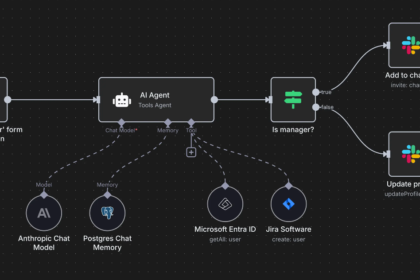
Concretely, this usually means using a no-code automation platform like Zapier or n8n as the connective tissue between your notetaker and everything else. If you haven’t set up this kind of connection before, it’s worth reading through a general walkthrough of how Zapier and AI can work together to cut hours of manual work every week, since the same trigger-and-action logic applies here.
A workable routing setup for a client-facing business looks like this: when a new meeting summary is created in your notetaker, trigger an automation that does three things in parallel. First, it appends the action items to a shared task board (Trello, Asana, ClickUp, whatever your team already uses) with the assigned owner and a due date pulled from the summary. Second, it logs a note against the relevant contact or deal in your CRM, so anyone who opens that record later sees exactly what was discussed without hunting through email threads. Third, it flags any open question that needs a human decision and sends it to a dedicated Slack channel or a daily digest, rather than letting it sit buried in a summary nobody re-opens.
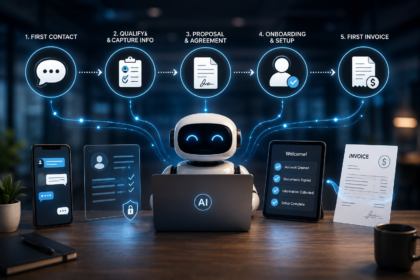
If you’re running client work end-to-end, this routing stage connects naturally with the onboarding side of your business too. A discovery call summary can trigger the same kind of intake data used at the start of a client onboarding automation, so the information a prospect gives you on a call doesn’t have to be re-typed into an onboarding form later.
Stage 4: Execute — turning summaries into finished follow-ups
The final stage is where most of the actual time savings live, because drafting follow-up communication is usually the slowest manual step in the whole process. Once you have a structured summary and it’s routed to the right place, the last mile is having AI draft the follow-up itself: the recap email to the client, the internal Slack update, or the proposal outline based on what was discussed.
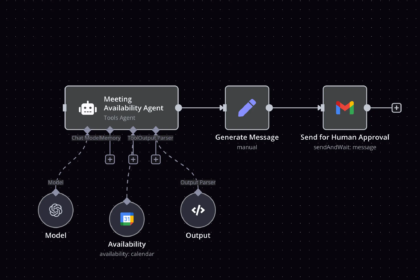
This is a natural extension of inbox automation. If you’ve already set up a system where AI drafts replies to incoming leads, the same drafting logic applies here: feed the meeting summary into a prompt that generates a client-ready recap email, have it land in your drafts folder, and give it a quick read before sending. The point isn’t to remove your judgment from the loop, it’s to remove the blank-page problem. Writing a recap from scratch after a 45-minute call is a genuinely unpleasant task that people put off for days. Editing a draft that’s already 80% correct takes two minutes.
For sales-heavy businesses, this stage can go one step further by having AI draft the next-step proposal or contract outline directly from the call notes, using whatever was agreed on as the starting point. This is where the earlier choice of notetaker matters most: tools with strong CRM integration, Fireflies in particular, make this handoff far smoother because the deal record already has the context needed to generate an accurate next step.
A worked example: automating a single sales call end-to-end
It helps to see the whole pipeline stitched together rather than treated as four abstract stages. Here’s what a fully automated flow looks like for a freelancer or small agency running discovery calls.
The call happens on Zoom with Fathom or Fireflies joining as a notetaker. Within about a minute of the call ending, a structured summary exists with decisions, action items, and open questions clearly separated. An automation platform picks up that summary the moment it’s created and does the following without any manual intervention: it creates a new deal note in the CRM with the full summary attached, it creates three tasks on the team’s board, each with an owner and a due date pulled straight from the action items, it drafts a follow-up email to the prospect using the summary as context and drops it into a drafts folder for a quick human review, and it posts a short digest into a Slack channel so the rest of the team knows the deal moved forward without anyone having to type a status update.
The only manual steps left in that whole sequence are a thirty-second glance at the drafted email before hitting send, and occasionally resolving one of the flagged open questions. Everything else, capturing, structuring, routing, and drafting, happens without a keyboard. That’s the difference between “using an AI notetaker” and actually automating the meeting workflow.
Privacy, consent, and the parts you shouldn’t automate away
Recording conversations carries real legal and ethical weight, and it’s worth being deliberate about it before wiring up any of this. Recording laws vary by location: some jurisdictions require only one party to consent to a recording, others require every participant to agree before you hit record. If you’re running client calls across different states or countries, the safest default is to always ask for verbal consent at the start of the call and to mention in your calendar invite that the meeting will be recorded and summarized by AI. Most clients don’t mind, and being upfront about it builds more trust than it costs.
There’s also a judgment question worth flagging separately from the legal one. Automating the mechanical parts of meeting follow-up, transcription, task creation, and CRM logging, is close to a pure win with very little downside. Automating the actual decisions made in that follow-up is a different matter. A drafted recap email should always get a human glance before it goes out, because AI-generated summaries occasionally misattribute who agreed to what, especially on calls with more than two or three speakers. Treat the automation as a very fast first draft machine, not a system you can fully trust unattended, at least until you’ve verified its accuracy on a few dozen of your own calls.
Common mistakes people make when automating meeting workflows
The most common mistake is stopping at capture. People sign up for a notetaker, are impressed by the summary quality, and never build the routing layer that would actually save them time. A transcript sitting in an app is not a workflow; it’s just a nicer-looking version of the same manual copy-paste problem.
The second mistake is over-customizing the summary template before you’ve run even a handful of real meetings through it. It’s tempting to spend an afternoon perfecting the exact structure of your summary before automating anything downstream. In practice, it’s far more useful to get a rough pipeline running end-to-end in a single afternoon and refine the template based on what you actually notice is missing after a week of real calls.
The third mistake is connecting every possible tool at once. Start with one downstream destination, usually your task manager or your CRM, get that working reliably, and only then add the second and third connections. A routing setup with five integrations that half-work is worse than one integration that works every single time, because broken automations quietly erode trust and people go back to doing things manually “just to be safe.”
The fourth mistake is treating this as a one-tool decision. The best setups usually combine a dedicated notetaker for capture and structuring with a general automation platform for routing, rather than trying to force one tool to do everything. If you’re new to the no-code automation side of this, it’s worth spending an hour with a broader introduction to building simple AI agents without writing code before you try to wire up a multi-step meeting pipeline, since the underlying trigger-and-action concepts are the same ones you’ll use here.
Where this fits in your broader automation stack
Meeting automation rarely exists in isolation, it’s most valuable as one piece of a wider system. If you’re building out your automation stack from scratch, it’s worth seeing where this slots in relative to everything else you could be automating. A broader overview of the workflows worth prioritizing first is covered in a look at the automation workflows every solopreneur should have running in 2026, and meeting-to-CRM automation consistently ranks as one of the highest-leverage additions because it touches every client relationship rather than a single channel.
It’s also worth thinking about how this connects to the front end of your funnel. The prospect who books a discovery call may have first come through a chatbot or a support conversation. If you’ve already set up an AI chatbot to handle first-line customer support, the handoff from chatbot conversation to human discovery call is a natural point to carry context forward, so the person on the call already has a summary of what the prospect asked about before the meeting even starts.
Getting started this week
You don’t need to build the entire four-stage pipeline before you see value. Start with just capture and structure: pick one notetaker, Fathom if you want free and simple, Fireflies if you’re already CRM-heavy, and run it on your next five calls. Read the summaries critically and note what’s missing compared to what you’d write by hand.
Once you trust the summaries, add a single routing connection: pick the one downstream tool that would save you the most manual copy-pasting, usually your CRM or your task manager, and build one automation that pushes action items there automatically. Only after that’s running reliably for a couple of weeks should you add the drafting stage, where AI writes your follow-up emails from the call summary.
Built in that order, over two or three weeks, most small teams end up with a system that turns every meeting into logged CRM context, assigned tasks, and a drafted follow-up, with no manual data entry at any point in between. The time saved compounds, because it’s not just the minutes spent writing a recap, it’s every downstream delay caused by information that used to live only in someone’s memory.
Disclaimer: This article is for informational purposes only and does not constitute professional, legal, or business advice. Recording and transcription laws vary by jurisdiction; always confirm consent requirements for your location before recording calls. Tool names, pricing, and features mentioned above reflect publicly available information at the time of writing and may change. UseAIPulse is not affiliated with and does not guarantee the performance of any third-party tool mentioned in this article. Always test any automation on a small scale before relying on it for client-facing work.
Sources:
- Simular AI, “Best AI Meeting Note Takers in 2026: Hands-On Review of 8 Tools” — simular.ai/alternatives/ai-meeting-note-takers
- Zack Proser, “Best AI Meeting Notes in 2026: 5 Useful Choices” — zackproser.com/blog/best-ai-meeting-notes-2026
- MeetingNotes.com, “The 10 Best AI Note Takers in 2026 (Tested and Ranked)” — meetingnotes.com/blog/best-ai-note-takers
- Alfred, “Best AI Meeting Notetakers 2026: 7 Tested (Bot-Free Picks)” — get-alfred.ai/blog/best-ai-meeting-notetakers
- TicNote, “TicNote Cloud vs Otter.ai vs Fireflies.ai vs Fathom” — ticnote.com/en/blog/ticnote-cloud-vs-otter-vs-fireflies-vs-fathom
- YourAIPlaybook, “AI Meeting Note-Takers Compared” — youraiplaybook.io/blog/ai-meeting-note-takers-compared.html
- Convo, “Otter vs Fireflies vs Fathom: Which AI Note Taker Wins in 2026?” — itsconvo.com/blog/otter-vs-fireflies-vs-fathom