


To automate invoicing with AI, connect three things: invoicing software that sends the invoice the moment work is done, automatic reminders that chase late payments, and an AI layer that reads your receipts and sorts your expenses. Most freelancers and small teams can set this up in a single afternoon.
- Why Invoicing and Bookkeeping Quietly Drain Small Businesses
- The Five-Stage System: Invoice, Remind, Capture, Reconcile, Review
- The Best Tools for Each Stage
- A Real Workflow, Start to Finish
- Prompts You Can Steal
- Privacy, Accuracy, and the Parts You Should Not Automate
- Common Mistakes That Undo the Savings
- Frequently Asked Questions
- Can AI really automate invoicing, or just draft it?
- What is the best way to automate invoicing with AI for a freelancer?
- Is it safe to put financial information into AI tools?
- How accurate is AI receipt scanning?
- Will automatic reminders annoy my clients?
- Do I still need an accountant?
- How long does it take to set up?
- How much does it cost?
- Conclusion
The AI does the typing, matching and nagging. You keep the final say on anything that involves money. This guide shows you exactly how, step by step.
Why Invoicing and Bookkeeping Quietly Drain Small Businesses
Money admin is the least glamorous part of running a business. It is also the part that decides whether you stay in business. You can do brilliant work and still run out of cash because an invoice went out late, or never went out at all.
Let’s look at why this problem is so common before we fix it.
Late payments are the norm, not the exception
The numbers are uncomfortable. QuickBooks’ 2026 late payments research reports that 59% of surveyed US small businesses had at least one invoice overdue by 30 days or more, with an average of roughly $17,700 owed to each business waiting on payment.
Freelancers are not spared. Bonsai analyzed three years of invoicing data from more than 100,000 freelancers and found that 29% of invoices were paid at least one day late. Xero’s small business data for the second quarter of 2026 shows invoices taking an average of 29.3 days to be paid, almost nine days past the due date.
None of this means your clients are bad people. It means a slow, manual invoicing process gives everyone an easy excuse to wait.
The hidden cost of doing it by hand
Think about what “doing invoices” really involves. You re-type client details, copy line items from a proposal, remember to send the invoice, remember to follow up, then hunt through your inbox for receipts at month end.
Each step is small. Together they eat hours and create errors. Industry benchmarks for accounts payable put manual invoice handling at roughly $15 to $16 per invoice, against as little as $3 when automated. Those figures come from larger finance teams, so your own volume is smaller. But they show where the time and money leak out.
What AI changes (and what it doesn’t)
Invoicing software has automated the plumbing for years. AI adds something new: it can read, interpret and draft.
It can read a crumpled receipt and pull out the vendor, date, tax and total. It can draft a reminder that matches the client’s tone. It can scan your transactions and flag the one that looks wrong. It can summarize your month in plain English.
What AI does not do is take responsibility. It will not decide how to treat a tricky expense, negotiate with a client who will not pay, or file your taxes. Think of it as a fast, tireless assistant that still needs a manager.
If you are building your wider automation stack, this workflow pairs well with the top AI automation workflows every solopreneur needs, where admin and invoicing appear as one of five core systems. This article is the deep dive.
The Five-Stage System: Invoice, Remind, Capture, Reconcile, Review
Most people automate one piece, usually the invoice itself, and stop. The real time savings appear when all five stages connect.
You do not need to build everything at once. Start with whichever stage currently costs you the most time or money, then work outward.
Stage 1: Create and send invoices automatically
The best invoice is the one that goes out the moment the work is approved. Delay is the enemy, because every day you wait to invoice is a day added to your payment time.
Set up a trigger that fires when a project, milestone or retainer period ends. That trigger can be a task marked “done” in your project tool, a signed deliverable, or a calendar date for recurring work. The automation then builds the invoice from a template and sends it with a payment link attached.
Here is what a good automated invoice includes:
- A clear due date, written as a date and not just “Net 14”
- A one-click payment link, so the client never has to hunt for bank details
- Line items that match the proposal, which removes “what is this charge?” emails
- Late fee or early payment terms, stated plainly
AI helps most at the drafting step. Feed it your signed proposal and ask it to produce the invoice line items and a short, friendly cover note. You review it in thirty seconds instead of building it from scratch.
If your invoice is the last step of your client journey, connect it to your onboarding flow. Our guide on automating client onboarding with AI shows how the first deposit invoice and the final invoice can run from the same system.
Stage 2: Automate payment reminders that actually get answered
Chasing money is awkward, so most people delay it. That delay is expensive. An automatic reminder sequence removes the awkwardness because the software sends it, not you.
A simple schedule works well:
- Three days before the due date: a friendly heads-up with the payment link
- On the due date: a short note confirming the invoice is due today
- Seven days after: a polite follow-up that asks if anything is blocking payment
- Fourteen days after: a firmer message that mentions any late fee and offers a call
Specific messages work better than generic ones. “Invoice 1042 for the website redesign is now seven days overdue” gets a reply. “Just checking in” gets ignored.
AI adds value here by adjusting tone and context. A long-term client gets a warm nudge. A new client who has missed two deadlines gets something firmer. You can also ask AI to flag clients whose payment history suggests a risk, so you can ask for a deposit next time.
Always keep one human rule: any reminder after the second one gets your eyes before it sends. The relationship matters more than the speed.
Stage 3: Capture receipts and expenses with AI
This is where AI feels like magic. Instead of typing each expense into a spreadsheet, you snap a photo, forward an email, or drop a PDF into a folder. An AI receipt scanner extracts the supplier, date, tax and total, then categorizes it.
Dext, for example, says its AI extracts receipt and invoice data with 99.9% accuracy and syncs it to your accounting software. Treat that as a vendor claim rather than a guarantee. Clean printed receipts usually scan well, while crumpled or handwritten ones need a quick human check.
Set up three habits to make capture painless:
- Create one forwarding email address for every invoice and receipt you receive
- Photograph paper receipts the same day, before they fade or vanish
- Connect your bank feed, so transactions arrive without any typing
Once those habits are in place, your books fill themselves in the background.
Stage 4: Reconcile and categorize transactions
Reconciliation means matching what your bank says happened with what your books say happened. It is the step people dread most, and it is where AI saves the most mental effort.
Modern accounting platforms suggest a category and a match for each bank transaction. They learn from your corrections, so the suggestions improve over time. You approve in bulk rather than coding each line by hand.
A good routine is a ten-minute weekly review. Open the list of suggested matches, approve the obvious ones, and investigate anything unusual. Weekly review keeps the monthly close from turning into a weekend project.
Stage 5: Review monthly and prepare for tax season
The final stage closes the loop. Once a month, ask your AI assistant to summarize your numbers: money invoiced, money collected, money still owed, top expenses, and anything that changed from last month.
This takes five minutes and gives you something most small businesses lack: an honest view of cash flow while there is still time to act. Spot a client paying later every month? Change their terms. Notice a subscription you forgot about? Cancel it.
At tax time, your accountant receives clean, categorized records with receipts attached. That alone can reduce the hours they bill you.
For help turning these steps into a repeatable agent, see our beginner guide to building AI agents without coding.
The Best Tools for Each Stage
You do not need ten subscriptions. Most people run this whole system on one accounting platform, one capture tool, and one automation hub. Here is how the main options compare.
| Tool | Best for | Pricing note | Where it shines |
|---|---|---|---|
| FreshBooks | Freelancers and service businesses | Paid, check current plans | Clean invoicing and client-friendly payment flow |
| Wave | Solo operators on a tight budget | Free plan available | Free invoicing and basic bookkeeping |
| Xero | Growing teams | Paid, check current plans | Bank reconciliation and a large app marketplace |
| QuickBooks Online | Businesses that share books with an accountant | Paid, check current plans | Wide accountant support and built-in AI assistance |
| Dext | Receipt and invoice capture | Paid, free trial | Reads documents and syncs to your accounting software |
| Expensify | Teams with many small expenses | Free tier plus paid plans | SmartScan receipts and reimbursements |
| Zapier or n8n | Connecting everything together | Free tiers available | Triggers invoices and reminders from other tools |
| A general AI assistant | Drafting and summaries | Free tiers available | Reminder wording, cash flow summaries, invoice notes |
Prices and features change often, so always confirm on the vendor’s own site before you subscribe.
How to choose without overthinking it
Use these rules of thumb:
- If you sell your time, start with FreshBooks or QuickBooks for invoicing strength
- If your budget is close to zero, start with Wave and upgrade only when you outgrow it
- If you have an accountant, use the platform they already know, which removes friction at tax time
- If you sell physical products, favor QuickBooks or Xero for inventory support
Whatever you pick, make sure it connects to your bank and has a payment link feature. Those two features matter more than any AI badge on the homepage.
Connecting it all with Zapier or n8n
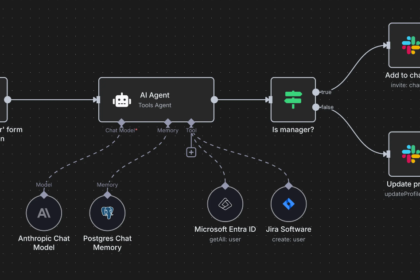
Your accounting tool will not always talk to the rest of your stack on its own. That is where an automation hub helps. A common setup uses a “project marked complete” trigger to create the invoice, and a “payment received” trigger to log the income and send a thank-you note.
If you have not used these tools before, start with our walkthrough on using Zapier and AI to save hours every week. If you prefer a free, self-hosted option, the n8n guide for content businesses explains the same trigger-and-action logic.
A Real Workflow, Start to Finish
Seeing the whole chain helps more than reading about each stage. Here is an example scenario for a freelance designer who just finished a $2,400 brand project. The numbers are illustrative.
From “approved” to “paid” in seven steps
- The client approves the final files. The designer moves the project card to “Done.”
- The automation fires. It creates an invoice from the signed proposal and drafts a short cover note using AI.
- The designer reviews the draft. This takes about thirty seconds, then the invoice goes out with a payment link.
- Reminders queue up. Messages are scheduled for three days before, on, and seven days after the due date.
- The client pays. The payment is logged automatically and a thank-you email goes out.
- Expenses are captured. The stock photo license and software subscription for the project arrive as forwarded receipts and are categorized by AI.
- The weekly review closes the loop. The designer approves the suggested bank matches in ten minutes.
No spreadsheets were opened. No invoice was forgotten. No awkward “just following up” email was written from scratch.
What it looks like in your week
Once the system runs, your hands-on time is small and predictable.
| When | What you do | Time |
|---|---|---|
| Per project | Review the drafted invoice before sending | 1 minute |
| Weekly | Approve bank matches and check flagged items | 10 minutes |
| Monthly | Read the AI cash flow summary and act on it | 10 minutes |
| Quarterly | Review the workflow and update templates | 30 minutes |
Compare that with a full evening of month-end catch-up, and the value is clear.
Prompts You Can Steal
The quality of AI output depends on how specific your instructions are. Here are three prompts you can copy and adapt. Replace anything in brackets with your own details.
A payment reminder prompt
“You are a polite, professional assistant for a [your industry] business. Write a payment reminder for invoice [number] for [amount], due on [date], which is now [X] days overdue. The client is [new / long-term]. Keep it under 90 words, stay friendly but clear, include the payment link [link], and do not threaten or invent late fees.”
An expense categorization prompt
“Here is a list of bank transactions: [paste]. Categorize each one using these categories: [software, travel, marketing, office, contractors, other]. If you are not sure about any item, label it [CHECK] instead of guessing. Return the result as a table with the date, vendor, amount and category.”
The [CHECK] tag matters. It forces the AI to admit uncertainty instead of confidently putting a personal expense into a business category.
A monthly cash flow summary prompt
“Here are my invoices and expenses for last month: [paste]. Summarize in under 150 words: total invoiced, total collected, total still owed, my three biggest expenses, and one thing that changed compared with the previous month. End with one suggestion to improve cash flow.”
These prompts work in any general AI assistant. For anything involving real client names or amounts, check the tool’s data policy first, as explained below.
Privacy, Accuracy, and the Parts You Should Not Automate
Financial data is sensitive. A few simple rules keep your automation safe and your reputation intact.
Keep a human on anything with money attached
AI drafts are a starting point. A wrong invoice amount or a reminder sent to a client who already paid can damage trust quickly.
Read every invoice before it sends until the workflow has proven reliable over a few dozen runs. Keep a human check on reminders after the second one, and on every refund, credit note or dispute.
Protect your financial data
Use reputable platforms with clear security and data policies. Avoid pasting full bank statements, tax IDs or client financial details into general-purpose AI tools unless the provider states that it is built for that purpose.
Where you can, use the AI features built into your accounting platform, because they are designed for financial data. For general drafting, remove sensitive details first and use placeholders.
Taxes and legal responsibility
AI can sort and summarize, but it cannot be held responsible for your tax return. Tax rules vary by country and change often. This article is general information and not financial, legal or tax advice, so confirm your setup with a qualified accountant.
A good test is simple: if a mistake could cost you real money or legal trouble, a human decides.
Common Mistakes That Undo the Savings
Most failed automations fail in predictable ways. Avoid these:
- Automating a messy process. If your pricing, terms or client details are unclear, automation only spreads the confusion faster. Clean up the basics first.
- Skipping the payment link. An invoice that makes the client hunt for bank details is an invoice that gets paid later.
- Sending vague reminders. Always include the invoice number, amount and due date.
- Trusting categories blindly. AI suggestions are good, not perfect. Review them weekly.
- Connecting five tools at once. Start with invoicing and reminders, run it for two weeks, then add capture and reconciliation.
- Never reviewing the system. Rates, clients and tools change. Check your templates every quarter.
Frequently Asked Questions
Can AI really automate invoicing, or just draft it?
Both. The software sends invoices and reminders automatically based on triggers, while AI handles the parts that need language and judgment, such as drafting notes and categorizing expenses. You still approve anything important.
What is the best way to automate invoicing with AI for a freelancer?
Start with an invoicing platform that supports payment links and automatic reminders, such as FreshBooks or Wave. Add an AI assistant for drafting and a receipt scanner for expenses. Then connect your project tool so invoices trigger when work is done.
Is it safe to put financial information into AI tools?
It can be, if you choose reputable platforms and read their data policies. Prefer AI features built into your accounting software for sensitive data, and use placeholders when you draft with a general assistant.
How accurate is AI receipt scanning?
Vendors claim very high accuracy on clean documents. In practice, printed receipts scan well while crumpled, faded or handwritten ones need a human check. Review a sample each week until you trust the results.
Will automatic reminders annoy my clients?
Not if they are specific, polite and well timed. Most clients appreciate a clear reminder with a payment link. Keep a personal touch for long-term clients and for anything overdue by more than a few weeks.
Do I still need an accountant?
Yes. Automation reduces the hours your accountant spends on data entry, but it does not replace their advice on tax, structure and compliance. Clean records usually make their work faster and cheaper.
How long does it take to set up?
A basic version, with automatic invoices and reminders, can be running in an afternoon. Adding receipt capture and bank reconciliation usually takes one to two weeks, mostly spent connecting accounts and correcting early categories.
How much does it cost?
You can start free with tools like Wave and the free tiers of automation and AI assistants. Paid plans vary by tool and change often, so check current pricing. Most people recover the cost quickly through faster payments and saved time.
Conclusion
Getting paid should not depend on your memory or your willingness to send an awkward email. When you automate invoicing with AI, the invoice goes out on time, reminders arrive without you lifting a finger, and receipts file themselves.
Start small. Pick the stage that hurts most, usually reminders or receipt capture, and automate just that this week. Review everything that touches money, and add the next stage once the first runs smoothly.
The goal is not to remove yourself from your finances. It is to remove the busywork so the decisions that matter get your full attention.
Sources
- Intuit QuickBooks, 2026 Small Business Late Payments Report, as summarized by Stealth Agents: Small Business Overdue Invoice Statistics 2026
- Bonsai freelancer invoicing data, via Agiled: Late Payment Statistics for Small Businesses & Freelancers
- Xero Small Business Insights, Q2 2026, via Action News Jax: The real cost of late payments
- Resolve, 13 statistics that quantify cost per invoice in manual vs automated flows
- Dext, receipt and invoice data extraction
- Costbench, Best Bookkeeping Software 2026
Disclaimer: This article is for informational purposes only and does not constitute financial, legal or tax advice. Tool names, pricing and features reflect publicly available information at the time of writing and may change. UseAIPulse is not affiliated with any tool mentioned. Always test any automation on a small scale before relying on it for client-facing work.