Open any article about artificial intelligence and you’ll run into the same handful of words over and over: prompt, model, hallucination, LLM, token, fine-tuning, agent. If you don’t already know what they mean, half of what you read won’t quite land, and it’s easy to feel like you’re missing some technical background you’re supposed to already have.
You’re not. Almost every AI term that sounds intimidating turns into something simple once someone explains it in plain language. That’s the goal of this glossary: no jargon left unexplained, no assumption that you’ve ever written a line of code. Just clear definitions of the words you’ll actually run into as a beginner, organized so you can read straight through or jump to whatever term sent you here.
The Foundations: AI, Machine Learning, and Where They Come From
Artificial Intelligence (AI)
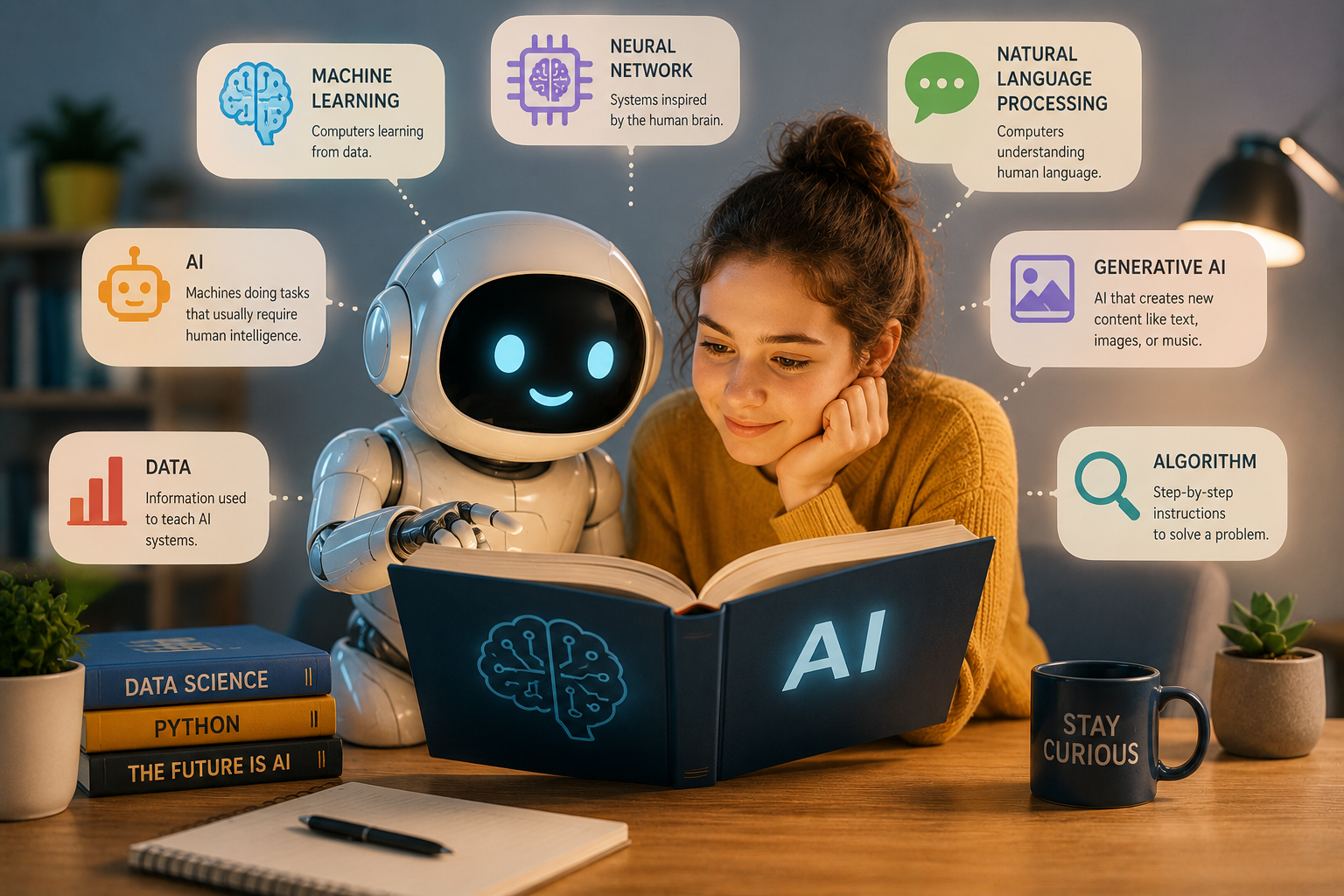
The broad umbrella term for computer systems designed to perform tasks that normally require human intelligence: understanding language, recognizing images, making predictions, or generating new content. “AI” isn’t one single technology — it covers many different tools and techniques, from the simple recommendation algorithm that suggests what to watch next, to the chatbot you type questions into. If you want the full breakdown of what that actually means in practice, What Is AI, Really? The Plain-English Guide Every Beginner Needs is a good next stop.
Machine Learning (ML)
A subset of AI, and the approach behind almost everything people mean when they say “AI” today. Instead of a programmer writing explicit rules for every situation, a machine learning system is shown huge amounts of examples and learns the patterns itself. Show it thousands of labeled photos of cats and dogs, and it learns to tell the difference on its own — nobody hand-coded “look for pointy ears.”
Neural Network
The structure that most modern machine learning is built on, loosely inspired by how neurons in a brain connect to each other. A neural network is made of layers of simple mathematical units that pass information to one another, gradually transforming raw input (like text or pixels) into a useful output (like a translation or a description). You don’t need to understand the math to use AI tools, but the term shows up constantly, so it’s worth recognizing.
Deep Learning
Machine learning using neural networks with many layers stacked on top of each other — hence “deep.” This is the technique that made the current wave of AI possible: image recognition, voice assistants, and the chatbots you interact with today all rely on deep learning under the hood.
Natural Language Processing (NLP)
The field of AI focused specifically on understanding and generating human language, rather than images, numbers, or other kinds of data. Every time an AI tool answers a question, translates a sentence, or summarizes an article, that’s NLP at work.
The Tools You Actually Use
LLM (Large Language Model)
This is the technology behind tools like ChatGPT and Claude. An LLM is a type of AI trained on enormous amounts of text so it can predict what word is likely to come next in a sentence, given everything that came before it. That prediction process is the entire mechanism — it’s not “thinking” or “understanding” the way a person does, it’s pattern-matching at a massive scale. Understanding this one idea explains a lot about why AI sometimes sounds completely confident and is still wrong.
Foundation Model
A large, general-purpose AI model trained on broad data, meant to serve as a base that can be adapted to many different tasks — answering questions, writing code, analyzing images — rather than being built for just one job. GPT, Claude, and Gemini are all examples of foundation models. Think of it as the engine that many different specific tools get built on top of.
Chatbot / AI Assistant
The interface you actually talk to — the chat window where you type a question and get an answer back. ChatGPT, Claude, and Gemini are all chatbots built on top of an LLM; the chatbot is the front door, the LLM is what’s doing the work behind it. If you’re still not sure what’s happening under the hood when you use one, What Is ChatGPT and How Does It Actually Work? walks through it step by step.
Generative AI
AI that creates new content — text, images, audio, video, or code — rather than just analyzing or sorting existing information. ChatGPT, Claude, and image tools like Midjourney all fall under this category. When people talk about “the AI boom,” this is usually what they mean: AI that produces something new on demand, instead of just labeling or predicting.
Multimodal AI
An AI system that can work with more than just text — understanding images, audio, or video in addition to written language. This is why you can now upload a photo to a chatbot and ask it to describe or analyze what’s in it, or why some assistants can listen to a voice recording and respond out loud.
AI Agent / Agentic AI
A newer category of AI that doesn’t just answer a question, but can take actions on your behalf — browsing a website, booking something, or completing a multi-step task with minimal supervision. A regular chatbot tells you how to do something; an agent can actually go and do parts of it. You’ll see this term used more and more as tools move from “answering” to “acting.”
How You Talk to AI
Prompt
The instruction or question you give an AI tool. This is arguably the single most important word in this glossary, because the quality of your prompt directly shapes the quality of the answer you get. A vague prompt (“write about marketing”) gets a generic, forgettable answer. A specific one — with context, format, and tone spelled out — gets something you can actually use. If you only read one linked guide from this entire glossary, make it How to Write the Perfect AI Prompt (Step-by-Step for Beginners); it’s the difference between fighting with AI and getting real value out of it.
Prompt Engineering
A slightly fancier name for the same skill: structuring prompts carefully — with clear goals, context, and constraints — to get better, more consistent results. Despite the technical-sounding name, you don’t need a computer science background to do this well. It’s really just clear communication, applied to a system that takes instructions literally and doesn’t fill in gaps the way a person would.
Context Window
How much information an AI can “hold in mind” at once during a conversation, including everything you’ve typed earlier in the same chat. Once a conversation runs past that limit, the AI starts losing track of the earliest parts. This is why long conversations can sometimes feel like the AI “forgot” something you mentioned a while back — it’s not being careless, it simply ran out of room to keep that detail in view.
Token
The small chunks of text an AI model processes internally, roughly a word or part of a word. You’ll mostly encounter this term when a tool mentions limits: how much text you can paste in at once, or how long a response can be. You don’t need to calculate tokens yourself, but knowing the word exists helps when you read about pricing tiers or usage caps, since many AI services charge based on token count.
Zero-Shot and Few-Shot Prompting
Two ways of asking an AI to do a task. “Zero-shot” means you ask it to do something with no examples at all — just a plain instruction. “Few-shot” means you give it a couple of examples of what you want first, then ask it to continue in the same style. If you’ve ever pasted in a sample email and asked an AI to “write more like this one,” you were using few-shot prompting without knowing the term for it.
Where AI Gets Things Wrong
Hallucination
When an AI generates information that sounds confident and correct but is actually false — a made-up statistic, a fake quote, a citation that doesn’t exist, or a confidently wrong historical date. This happens because the model is predicting plausible-sounding text, not checking facts against a database. It’s arguably the single most important limitation to understand before trusting AI with anything factual, and it’s a well-documented issue across every major AI tool, not just one brand. Why AI Gets Things Wrong: A Beginner’s Guide to AI Hallucinations (and How to Catch Them) covers exactly how to spot these before they cause a real problem, whether that’s in a school assignment, a work email, or something you publish.
Bias (in AI)
Skewed or unfair patterns in an AI’s output, usually inherited from imbalances in the data it was trained on. This can show up subtly — favoring certain viewpoints, cultures, or demographics over others, or reflecting outdated assumptions from older text — and it’s one of several honest downsides worth knowing before you lean on AI for anything sensitive, like hiring decisions or health information.
Training Data
The massive collection of text (and sometimes images) an AI model learned from before it was ever released to the public. This is also where a lot of bias and blind spots in AI answers come from — the model reflects patterns in what it was trained on, including gaps, outdated information, or one-sided perspectives that existed in that original material. It’s also why an AI model has a “knowledge cutoff”: a point in time after which it simply wasn’t trained on anything newer.
Overreliance
Not a technical term exactly, but a genuine risk worth naming: leaning on AI so heavily for thinking, writing, or decision-making that your own judgment gets rustier over time. This shows up most in contexts like schoolwork, where the temptation to let AI do the thinking is strongest — something covered in more depth in How AI Is Changing Education: What Students Need to Know. For a fuller picture of this and related risks — privacy, accuracy, and dependence — The Real Risks of Using AI: What Everyone Should Know is worth reading before you build AI into your daily routine.
Behind the Scenes: How Models Are Built
Parameters
The internal settings inside a neural network that get adjusted during training to help it make better predictions. You’ll often see AI models described by how many parameters they have — billions, sometimes over a trillion. More parameters generally (though not always) means a more capable model, similar to how a bigger, more detailed map can represent more of the world, though it also takes more computing power to run.
Fine-Tuning
A process where a general-purpose foundation model gets additional, more specific training to perform better at a particular task — for example, tuning a model to write better legal summaries, or to respond in a specific brand voice for customer support. As a beginner you won’t do this yourself, but you’ll see the term when comparing AI tools built for specific industries or use cases.
RAG (Retrieval-Augmented Generation)
A technique where an AI model looks up relevant information from an outside source — a document, database, or the web — before generating its answer, instead of relying purely on what it memorized during training. This is one of the main ways AI tools reduce hallucinations and provide more current, accurate answers, since the model is grounding its response in something real rather than guessing from memory.
Temperature
A setting that controls how “creative” or “predictable” an AI’s responses are. A low temperature produces safer, more consistent, more repetitive answers; a high temperature produces more varied, surprising, sometimes riskier ones. Most people using a chatbot through its normal interface never touch this setting directly, but it’s worth knowing it exists if you ever explore more advanced tools or API access.
API (Application Programming Interface)
A way for one piece of software to talk to another. In AI, “using the API” usually means a developer is connecting directly to an AI model to build it into their own app or website, rather than using the model through a chat window like ChatGPT.com. If you’re not building software yourself, you likely won’t need to touch this, but you’ll see it mentioned constantly in comparisons of AI tools and pricing.
Comparing Tools and Choosing One
With all of that vocabulary in place, the practical next step for most beginners is figuring out which actual tool to use. Claude vs ChatGPT vs Gemini: Which AI Is Best compares the major chatbots built on different foundation models, so you can choose based on what you’ll actually use it for — writing, research, coding, or day-to-day questions — rather than picking whichever one you’ve simply heard of most.
If your main interest is applying AI at work, AI for Small Business Owners: 10 Ways to Work Smarter shows practical, low-cost ways small teams are already using these tools day to day, and AI Prompts for Business: 50 Ready-to-Use Prompts to Grow Your Business gives you ready-made prompt templates so you’re not starting from a blank page while you practice the vocabulary above.
Frequently Asked Questions
Do I need to memorize all of these terms to use AI well? No. Understanding “prompt,” “hallucination,” and “LLM” will get you 90% of the way to following any AI conversation or article. The rest of this glossary exists so you have somewhere to come back to when a less common term shows up.
Why does every AI company seem to use slightly different words for the same thing? The field is still young and moving fast, so terminology hasn’t fully settled. “Agent” and “agentic AI” are good examples — both get used to describe similar ideas depending on which company is writing about it.
Is “AI” the same thing as “ChatGPT”? No. ChatGPT is one specific chatbot, built by one specific company, using one specific family of models. “AI” is the much broader category that ChatGPT, Claude, Gemini, and hundreds of other tools all belong to.
What’s the difference between AI and automation? Automation follows fixed, pre-programmed rules — the same input always produces the same output. AI, especially machine learning, can handle situations it wasn’t explicitly programmed for by recognizing patterns instead. Many real tools actually combine both.
Putting the Vocabulary to Work
Knowing these terms won’t make you an AI expert overnight, but it removes the biggest barrier most beginners run into: not understanding the language well enough to follow along. From here, the most useful next step is practical — pick a tool, learn to prompt it well, and stay aware of where it’s likely to get things wrong. Bookmark this glossary; you’ll likely find yourself back here the next time an unfamiliar term shows up in an AI headline.