A few months ago I published a “beginner’s guide” article with a statistic I never checked: “73% of marketers now use AI in their content workflow, according to a 2025 industry survey.” It sounded plausible. It fit the narrative. I didn’t verify it, because it was 11 p.m. and the article was otherwise done.
- Why AI Gets Facts Wrong in the First Place
- The Five Categories of Claims That Need Checking
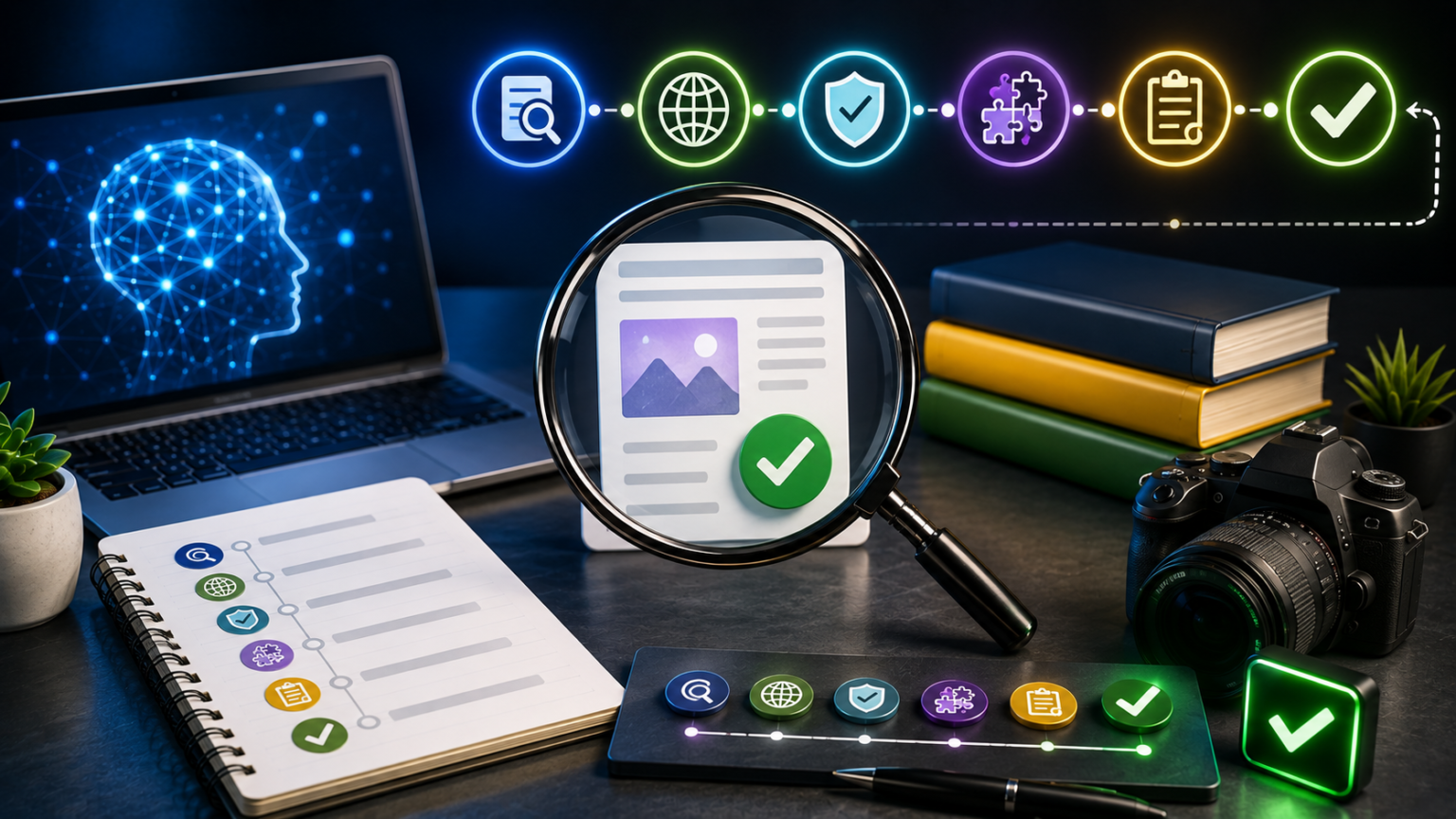
- The 6-Step Fact-Checking Workflow
- How to Prompt AI to Reduce Hallucinations Upfront
- Tools That Actually Help With Verification
- Building a Fact-Check Layer Into Your Content System
- Common Excuses That Lead to Bad Fact-Checking (And Why They Don’t Hold Up)
- Frequently Asked Questions
- The Honest Summary
- Sources & Further Reading
Three weeks later, a reader emailed asking for the source. I went looking for it. It didn’t exist. The AI had generated a number that felt statistically reasonable and attached it to a survey that was never conducted. I’d published a fabricated statistic under my own byline, and a stranger caught it before I did.
That email changed how I publish anything AI touches. Not because AI is untrustworthy in some abstract sense — it’s genuinely useful — but because it is wrong with exactly the same confident tone it uses when it’s right. There’s no hedge in the voice, no tell, no italics that say “I’m guessing here.” You have to build the skepticism yourself, because the model won’t do it for you.
This article is the fact-checking system I built after that mistake. It’s not theoretical. It’s the actual checklist I run before anything AI-assisted goes live, and it works whether you’re publishing a 400-word social caption or a 3,000-word pillar page.
Why AI Gets Facts Wrong in the First Place
It helps to actually understand the mechanism, because “AI sometimes lies” is a misleading way to think about it. A large language model isn’t retrieving facts from a database and occasionally getting the lookup wrong. It’s predicting the most statistically plausible next word based on patterns in its training data. Most of the time, that prediction lines up with reality, because reality shows up a lot in training data. But when the model doesn’t have a strong, specific memory of a fact — an exact statistic, a niche study, a precise date — it doesn’t stop and say “I don’t know.” It keeps generating the most plausible-sounding continuation, which can look identical to a real fact while being entirely invented.
This is what’s usually called a hallucination, and our companion piece on why AI gets things wrong and how to catch hallucinations breaks down the mechanics in more depth if you want the full technical picture. For this article, the important takeaway is simpler: hallucinations aren’t rare edge cases. They show up constantly in exactly the areas where creators are least likely to double-check — statistics, dates, quotes, product details, and “studies show” claims — because those are the details that sound most authoritative and least worth questioning.
Three situations make hallucinations especially likely:
Specificity without grounding. Ask an AI for a vague trend and it’ll usually stay appropriately vague. Ask it for an exact number — “what percentage of small businesses use AI tools” — and it often manufactures precision it doesn’t have, because a specific number sounds more helpful than “many” or “a growing share.”
Attribution requests. Asking AI to attach a claim to a named source (“according to a Harvard study,” “as reported by Forbes”) is one of the highest-risk prompts you can write. The model will frequently invent a plausible-sounding source rather than admit it doesn’t have one.
Anything past its knowledge cutoff. Ask about a recent product update, a current price, or “the latest” version of anything, and the model may blend outdated training data with guesswork, producing an answer that sounds current but isn’t.
Knowing this changes how you read AI output. You stop treating confident phrasing as a signal of accuracy — because in AI writing, confidence is just a style, not a guarantee.
The Five Categories of Claims That Need Checking
Not every sentence in an AI draft carries the same risk. Trying to verify literally everything is how fact-checking dies from exhaustion halfway through a project. Instead, sort every factual claim into one of five buckets and treat each differently.
1. Statistics and numbers. Any percentage, dollar figure, growth rate, or count. These are the highest-risk category and need a verified source every time, no exceptions.
2. Attributed claims. Anything phrased as “according to,” “研究显示,” “experts say,” or “a report found.” If AI names a source, you need to independently confirm that source exists and actually says what’s claimed.
3. Quotes. Any sentence in quotation marks attributed to a real person. AI-fabricated quotes are common and especially damaging, because they falsely put words in someone’s mouth. Never publish a quote you haven’t verified word-for-word against an original source.
4. Product, tool, or pricing details. Feature lists, pricing tiers, and “supports X integration” claims change constantly and are exactly the kind of specific, checkable detail AI gets wrong when its training data is stale.
5. Dates, timelines, and “current” claims. Anything using words like “recently,” “now,” “as of 2026,” or “the latest version.” These need a live check, not a memory check, because the model’s sense of “now” is frozen at its training cutoff.
Everything else — general explanations, widely known concepts, your own opinions and examples — doesn’t need the same scrutiny. This is where a lot of new fact-checkers over-correct: they either check nothing, or they try to verify every sentence and burn out. The five-category sort keeps your effort where the actual risk lives.
The 6-Step Fact-Checking Workflow
This is the process, in order. It’s designed to slot into the drafting workflow described in our AI SEO writing guide and the broader system in the complete AI content creation playbook — think of it as the missing verification layer that sits between “draft finished” and “hit publish.”
Step 1: Highlight Every Factual Claim As You Draft
Don’t wait until the article is finished to start fact-checking — you’ll lose track of what came from AI versus what you added yourself. As you draft or review each section, highlight or bold every statistic, attribution, quote, product detail, and date-sensitive claim in a different color or format. By the time the draft is done, you have a visible map of every claim that needs verification, instead of having to re-read the whole piece hunting for numbers.
Step 2: Ask the AI to Show Its Work
Before you go external, ask the model itself to flag its own uncertainty. This won’t catch everything — models are notoriously bad at accurately self-assessing their own hallucinations — but it’s a useful first pass that catches the obvious cases.
“Go through this article and list every specific statistic, date, named study, or attributed claim. For each one, tell me your actual confidence level that it’s accurate, and whether you have a specific source in mind or generated a plausible-sounding estimate.”
You’ll often get a surprisingly honest answer here — the model will sometimes admit “I don’t have a specific source for this figure; it’s a reasonable estimate based on general trends.” Any claim flagged as uncertain goes straight to a hard verification step, not a soft one.
Step 3: Verify Every Statistic at the Source
For any number, don’t stop at the first search result that happens to repeat the same figure — a lot of hallucinated statistics get picked up and re-published across low-quality sites, creating a false sense of confirmation. Trace the number back to the original source: the actual study, the actual report, the actual dataset. If you can’t find the primary source after a genuine search, the number doesn’t go in the article. Replace it with a qualitative statement (“a growing share of,” “most,” “a meaningful minority”) or cut it entirely.
Step 4: Confirm Quotes Word-for-Word
If a draft includes a quote attributed to a real person, find the original interview, article, transcript, or social post it supposedly came from. Compare it word-for-word. AI-generated quotes are frequently close-but-not-exact paraphrases dressed up as verbatim quotes, or entirely invented lines that sound like something the person might say. Neither is acceptable to publish. If you can’t locate and confirm the exact original wording, don’t attribute a quote to that person — either drop it or clearly paraphrase without quotation marks.
Step 5: Check Product and Pricing Details Live
For any tool, platform, or product mentioned with specifics — pricing, features, integrations — go directly to the current source (the company’s own pricing page, documentation, or changelog) rather than trusting the AI’s memory or an older article that itself may be outdated. Pricing and feature sets in the AI space change fast; a figure that was accurate six months ago can easily be wrong today.
Step 6: Do a Final “Would I Bet on This” Pass
Once the individual checks are done, read through the article one more time and, for every remaining factual claim, ask yourself honestly: would I bet money that this is true? If the answer is anything less than a confident yes, you haven’t actually verified it yet — you’ve just gotten comfortable with it. This step catches the claims that quietly survived the earlier steps because they felt true rather than because they were confirmed true.
How to Prompt AI to Reduce Hallucinations Upfront
Fact-checking after the fact will always be necessary, but you can meaningfully reduce how much cleanup you need by prompting more carefully from the start.
Ask for uncertainty flags by default. Build this into your standard prompt:
“Where you’re not fully certain a claim, statistic, or attribution is accurate, explicitly say so rather than presenting it with full confidence. I’d rather see ‘I’m not certain of the exact figure here’ than a confident-sounding guess.”
Don’t ask for named studies or sources unless you plan to verify them anyway. If you ask “according to which study,” you’re inviting a fabricated citation. It’s often safer to write the claim without attribution first, then go find a real source to attach afterward, rather than asking the AI to manufacture one.
Request ranges over false precision. Asking for “approximately what percentage” tends to produce more honest, hedged answers than asking for an exact figure, which pushes the model toward manufactured precision.
Separate research from writing. Where possible, do your factual research first — pull real numbers from real sources — and then hand those verified facts to the AI as part of your brief, rather than asking it to generate facts on the fly. This flips the risk: the AI is now working from ground truth you supplied, not improvising.
Tools That Actually Help With Verification
No single tool replaces human judgment here, but a few make the process meaningfully faster.
Google Scholar and primary sources. For any statistic tied to research, Google Scholar gets you closer to the original study than a general web search, which tends to surface secondary articles quoting the same (sometimes wrong) number repeatedly.
Search engines with citation-aware AI answers, like Perplexity, are genuinely useful for a first-pass check because they show their sources inline — but treat their answers as a lead to verify, not a final confirmation. These tools can also hallucinate or misattribute, just less often than an ungrounded chat model.
Wayback Machine (web.archive.org). Useful for confirming what a company’s pricing or feature page actually said on a specific date, especially when you’re double-checking a claim that might have been true at the time an older source article was written but isn’t true anymore.
Reverse quote search. Paste a suspicious quote directly into a search engine in quotation marks. If it doesn’t return the original source verbatim, treat that as a serious red flag rather than assuming the quote is just hard to find.
A shared team fact-check doc. If you work with a small content team, a lightweight shared spreadsheet listing every published claim, its source link, and the date it was last verified turns fact-checking into an asset you build over time instead of a task you repeat from scratch on every article.
Building a Fact-Check Layer Into Your Content System
If you’re publishing regularly, fact-checking can’t be a thing you remember to do sometimes — it has to be a fixed stage in your workflow, the same way editing is. This connects directly to two other pieces worth reading if you haven’t already: how to build an AI content style guide covers how to standardize voice and tone across everything you publish, and how to edit AI-generated content so it stops sounding like AI covers the line-level editing pass. Fact-checking is the third pillar alongside those two — voice, polish, and accuracy — and skipping any one of them leaves a visible gap in the finished content.
A simple system that works for solo creators and small teams alike:
- Draft stage — highlight every factual claim as you write or review, per Step 1 above.
- Verification stage — a dedicated pass (even just 15–20 minutes for a standard article) where you work through the highlighted claims using the 6-step workflow.
- Sign-off stage — before publishing, do a final scan specifically for anything that slipped through: a stat added during a late edit, a quote inserted to punch up a section, a “recently” or “as of” claim that needs a date check.
- Post-publish monitoring — if a reader ever flags something (as happened to me), correct it immediately, note what went wrong, and feed that lesson back into your prompting habits going forward.
If you’re repurposing one article into multiple formats — a workflow covered in our guide to repurposing one piece of content into ten — fact-check the original source article thoroughly once, and then treat every derivative piece (social captions, video scripts, newsletter blurbs) as inheriting that verified foundation. Don’t let a fabricated stat quietly multiply across ten pieces of content because it was only ever checked in none of them.
Common Excuses That Lead to Bad Fact-Checking (And Why They Don’t Hold Up)
“It’s just a blog post, not journalism.” Readers don’t distinguish between “casual blog claim” and “verified fact” when they’re deciding whether to trust you. A wrong number erodes credibility exactly the same way regardless of the publishing format.
“It sounds right, so it’s probably fine.” This is precisely the trap. AI is specifically good at producing claims that sound right, because it’s optimizing for plausibility, not accuracy. “Sounds right” is not evidence — it’s the failure mode, not a check against it.
“I don’t have time to verify everything.” You don’t have to verify everything — that’s what the five-category sort in this article is for. You have to verify the small set of claims that actually carry risk: numbers, attributions, quotes, product specifics, and time-sensitive statements. That’s a fraction of most articles, not the whole thing.
“I’ll fix it if someone points it out.” Reactive correction is better than nothing, but it means readers encountered the error before you did, and some of them never come back to see the correction. The fact-check pass exists specifically to catch what would otherwise depend on a stranger’s goodwill.
Frequently Asked Questions
Does fact-checking slow down an AI content workflow too much to be practical? For a standard 1,500–2,500 word article, a focused fact-check pass usually takes 15–30 minutes once you’re used to the five-category sort. That’s a small fraction of total production time and it’s the difference between publishable content and a credibility risk.
Can I trust AI to fact-check its own output? Partially. Asking a model to flag its own uncertainty (Step 2) catches some hallucinations, but models are inconsistent at accurately judging their own confidence. Treat AI self-checking as a useful first filter, never as the final verification step.
What’s the single riskiest type of claim to leave unchecked? Quotes attributed to real people. A fabricated statistic is bad; a fabricated quote falsely attributed to a named individual can cause real reputational and even legal harm to that person, and to you as the publisher.
Should I cite my sources in the published article? Where practical, yes. Linking to the primary source for a statistic or study does two things: it lets readers verify the claim themselves, and it forces you to actually locate that source before publishing, which is a built-in accuracy check.
How do I fact-check content at scale if I’m publishing daily? Standardize the process into a checklist your team runs every time, use a shared fact-check log so verified sources can be reused across related articles, and reserve deep verification effort for anything statistic-heavy — lighter, opinion-driven pieces need less of this layer.
Is this different from checking AI content for plagiarism? Yes, and both matter, but they’re separate checks. Plagiarism detection looks at whether wording is original. Fact-checking looks at whether the claims are true. AI content can be 100% original phrasing and still be factually wrong — which is exactly why this layer can’t be skipped even after a plagiarism check comes back clean.
The Honest Summary
AI didn’t make fact-checking necessary — bad information has always needed checking. What AI changed is the volume and the confidence: it can generate more polished, more plausible-sounding, more confidently-worded misinformation, faster than any writer working alone ever could, and it does so with zero hesitation in its tone.
The fix isn’t distrusting every AI-assisted article you publish. It’s building a specific, repeatable layer into your workflow that catches the handful of claim types — statistics, attributions, quotes, product details, time-sensitive facts — where the risk actually concentrates. Do that consistently, and you get the speed AI offers without inheriting its blind spots.
The article that taught me this lesson is still live, corrected, with a note at the bottom acknowledging the original error. I’d rather you learn this from reading it here than from an email in your own inbox three weeks after you hit publish.
Sources & Further Reading
- Stanford Internet Observatory / Stanford HAI — research on large language model hallucination rates and reliability, hai.stanford.edu
- Google Search Central — Helpful Content Guidance — Google’s public documentation on content quality, accuracy, and E-E-A-T, developers.google.com/search
- Poynter Institute — International Fact-Checking Network (IFCN) — standards and methodology for professional fact-checking practices, poynter.org/ifcn
- Internet Archive — Wayback Machine — tool for verifying historical versions of web pages, pricing, and product claims, web.archive.org
- Google Scholar — search engine for peer-reviewed studies and primary academic sources, scholar.google.com
This article reflects the author’s tested workflow and general industry guidance on AI content verification. Always confirm platform-specific pricing, features, and policies directly on the provider’s official site, as these change frequently.