I used to treat every platform like a separate job. Blog post on Monday. Three tweets on Tuesday. A LinkedIn article on Wednesday. An email newsletter on Thursday. By Friday I was completely out of ideas and half-convinced I’d never have anything original to say again.
- Why Repurposing Is the Smartest Content Strategy in 2026
- What Counts as a “Core Content” Piece
- The Repurposing Framework: One Piece, Seven Formats
- How to Repurpose Content with AI: The Step-by-Step Workflow
- Step 1: Identify Your Core Piece and Extract the Key Points
- Step 2: Build the Blog Post (If You Don’t Have One Already)
- Step 3: Write the Twitter/X Thread
- Step 4: Create the LinkedIn Post
- Step 5: Draft the Email Newsletter
- Step 6: Write Short-Form Video Scripts
- Step 7: Generate Quote Cards and Carousel Content
- The Best AI Tools for Repurposing Content
- The Golden Rule of Repurposing: Same Idea, Different Language
- A Real Example: One Podcast Episode Into a Full Week
- Common Mistakes to Avoid
- Frequently Asked Questions
- The Takeaway
Then I changed one thing: I stopped creating content from scratch for every channel and started repurposing one strong idea across all of them using AI.
Now a single piece of core content — a well-researched article, a podcast episode, a webinar — feeds my entire content calendar for the week. I’m not cutting corners. I’m working smarter. And the output is genuinely better because I’m spending my energy on one thing instead of spreading it thin across six.
This guide walks you through exactly how to repurpose content with AI, the tools that make it fast, and the workflow you can copy starting today.
Why Repurposing Is the Smartest Content Strategy in 2026
Most creators have a content problem that isn’t what they think it is. They believe they don’t have enough ideas. The real problem is that they throw away most of the value of every idea they do have.
Think about what happens when you write a strong 1,500-word blog post. That post contains dozens of insights, quotes, statistics, opinions, and useful examples. In the old model, you published it, maybe shared it once on Twitter, and moved on. Most of that value disappeared.
Repurposing fixes that. It takes the same core thinking and reformats it for the audiences and platforms that would never read a blog post in the first place. The idea stays the same. The packaging changes. And with AI, the packaging happens in minutes instead of hours.
There’s also a psychological benefit that doesn’t get talked about enough: when you know one session of deep thinking produces a week of content, you stop dreading the blank page. You become protective of your best ideas instead of burning through them carelessly.
What Counts as a “Core Content” Piece
Before you can repurpose anything, you need something worth repurposing. Not everything qualifies.
A good core content piece is long-form, substantive, and based on your actual thinking. It contains:
- A clear argument or main point
- Supporting evidence, examples, or steps
- Your own perspective or experience
- Enough material to pull from (aim for at least 800–1,000 words or 15 minutes of audio/video)
The best sources to work from are podcast episodes and long interviews (because they’re rich in natural language and personal insight), long-form YouTube videos or webinars, original blog posts or newsletters, and recorded presentations or workshops.
If your source material is genuinely valuable, AI can extract and reformat that value across platforms without losing what made it good in the first place.
The Repurposing Framework: One Piece, Seven Formats
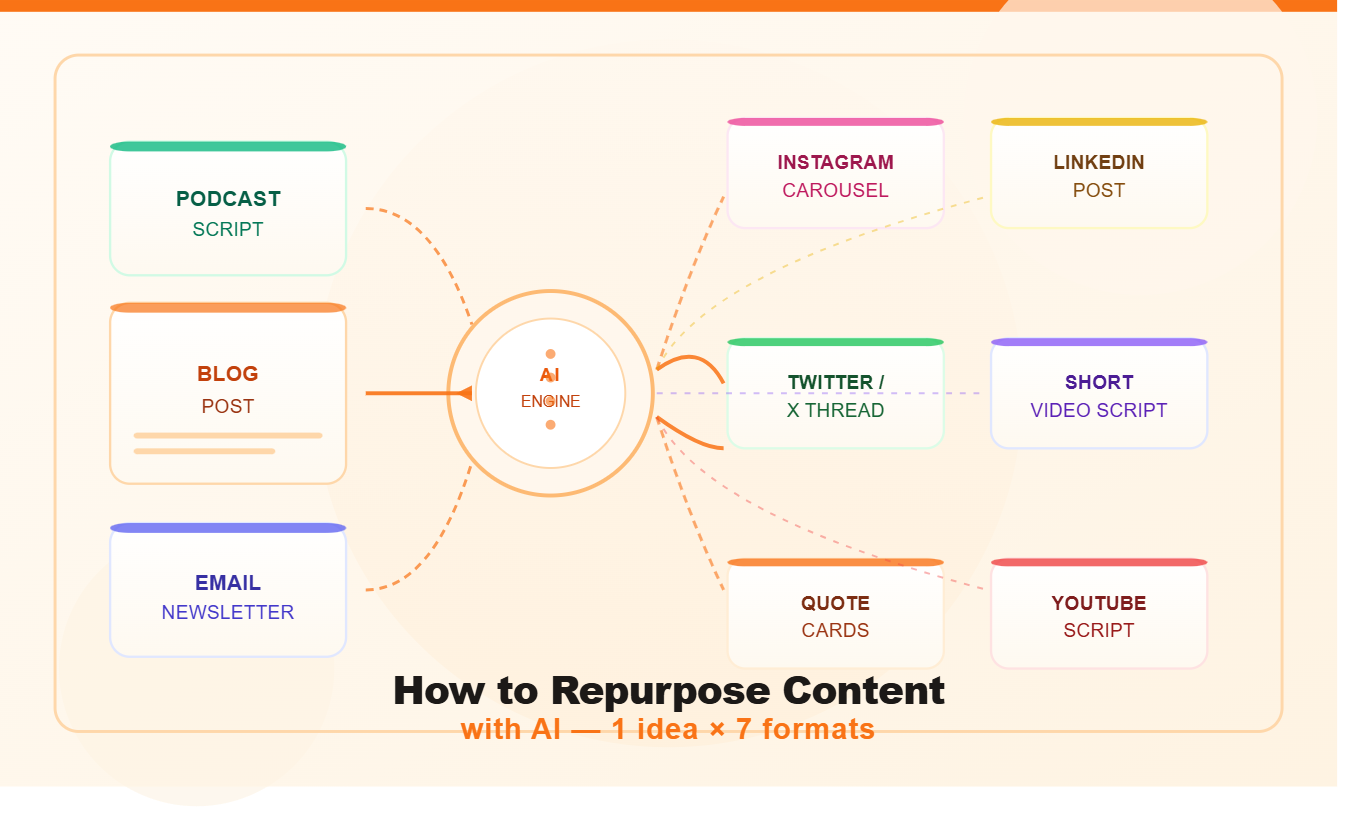
Here’s the core framework I use. Every piece of strong content can reliably become all of these:
- A blog post or long-form article
- A Twitter/X thread
- A LinkedIn post
- An email newsletter
- Three to five short-form video scripts (for Reels, Shorts, or TikTok)
- Five to ten social media quote cards
- A carousel post for Instagram or LinkedIn
That’s seven distinct formats from one idea. On some weeks, you only need three or four. The point is that you have options — and you’re never starting from zero.
How to Repurpose Content with AI: The Step-by-Step Workflow
Here’s the process in detail. You can run through this in under an hour for a week’s worth of content.
Step 1: Identify Your Core Piece and Extract the Key Points
Start by choosing this week’s source material. If you recorded a podcast episode, get the transcript. If you wrote a blog post, paste the full text. If it’s a video, pull the auto-transcript from YouTube.
Now ask your AI tool to extract the main ideas. A prompt that works well:
“I’m going to paste a [podcast transcript / blog post / video transcript]. Read it carefully and list the 7–10 most valuable, shareable insights from it. For each one, give me the core idea in one sentence and explain why it would resonate with an audience of [describe your audience].”
Read through what comes back. Add any insights the AI missed. Cut anything that’s too niche or won’t make sense out of context. What you’re left with is your raw material for the week.
Step 2: Build the Blog Post (If You Don’t Have One Already)
If your core content was a podcast or video, your first repurposed format is a written article. This is worth doing even if your audience is primarily video-based, because it builds search traffic and gives you a canonical home base for the idea.
Ask your AI to draft a structured blog post from the extracted key points. Give it the outline you want and ask for a first draft. Use the same editing discipline you’d apply to any AI content: read it out loud, add your voice, verify any facts, cut the filler.
If you already wrote the blog post and that’s your starting source, skip ahead to step three.
Step 3: Write the Twitter/X Thread
Threads are one of the highest-leverage formats for repurposing because they perform like standalone content on the platform but take only minutes to produce when you already have the source material.
The prompt to use:
“Based on these key points from my content on [topic], write a Twitter thread of 8–12 tweets. The first tweet should be a bold hook that makes someone stop scrolling. Each subsequent tweet should stand alone as useful insight. The last tweet should be a clear call to action. Use short sentences, a direct tone, and no filler words. Don’t use hashtags in the body of the thread.”
Review the thread carefully. The hook tweet is the most important — rewrite it yourself if the AI version feels generic. A thread with a weak first tweet won’t be read regardless of how good the rest of it is.
Step 4: Create the LinkedIn Post
LinkedIn rewards a different style than Twitter. Posts here tend to be longer (150–300 words), more personal in tone, and story-driven rather than insight-driven. The platform’s audience responds well to first-person narratives that lead to a business lesson.
Ask your AI to rewrite one of your key insights as a LinkedIn post in this format: a punchy opening line, a short personal story or context, the main insight, and a question to drive comments. That last part matters — LinkedIn’s algorithm rewards posts that generate replies, so ending with a genuine question is worth doing.
Edit the output to sound like you specifically, not like a generic “thought leader” account. LinkedIn audiences have high radar for templates.
Step 5: Draft the Email Newsletter
Your email list is your most valuable owned audience, and it deserves a version of this content tailored specifically for them. The email format is different from everything else: it’s more intimate, more conversational, and structured differently than a blog post.
A solid newsletter from repurposed content follows this structure:
- Opening: A personal sentence or two that gives context for why you’re writing about this topic this week
- The main value: Two or three of your best insights from the core piece, rewritten in a warmer, more direct tone
- A link to the full piece: If they want to go deeper
- One closing line: An honest takeaway or question
Ask your AI to draft this structure using your extracted key points, then rewrite the opening and closing yourself. Those two sections — the personal context and the closing thought — are where your relationship with your list lives. Don’t hand them entirely to a machine.
Step 6: Write Short-Form Video Scripts
Short-form video is where the most people will discover your content. One solid insight from your core piece can become three to five 30–60 second scripts for Reels, TikTok, or YouTube Shorts.
For each script, use this structure:
- Second 1–3: The hook. A bold claim, a surprising fact, or a direct question.
- Second 4–45: The value. Deliver the single insight clearly and quickly.
- Last 5–10 seconds: The CTA. Follow for more. Comment your answer. Check the full video linked in bio.
The key is to treat each short video as standalone — it should make complete sense even if someone has never heard of you or seen your longer content. Give your AI the key insight and ask it to produce three different hook variations, then pick the sharpest one.
Step 7: Generate Quote Cards and Carousel Content
Quote cards — single-sentence insights designed to be screenshotted or shared — are the easiest repurposing format and one of the most shareable. Ask your AI to extract 8–10 of the most quotable lines from your source material. Most of them will be pulled directly from what you said or wrote, which means they’re authentically yours.
For carousels (multi-slide posts on Instagram or LinkedIn), take your step-by-step content or your list of insights and turn each point into a slide. The first slide is the hook, the middle slides deliver the value one point at a time, and the last slide is a CTA or summary. AI can draft the copy for each slide in seconds once you feed it the structure.
The Best AI Tools for Repurposing Content
You don’t need to use all of these. Pick the combination that fits your workflow and budget.
For transcription and extraction: If your source content is audio or video, you’ll need a transcript first. Tools like Descript or Otter.ai handle this well. YouTube’s auto-transcription is decent for shorter videos and it’s free.
For writing and reformatting: Any capable general-purpose AI assistant handles most of the heavy lifting in this workflow. The quality of your output depends far more on your prompts than on the specific tool.
For social scheduling: Once you have your content across formats, tools like Buffer or Publer let you schedule everything in one session. Batch the creation, batch the scheduling, and your week is done.
For video clipping: If your source is a long video, OpusClip or Vizard can auto-clip the best moments into short-form format with captions added automatically. This cuts the short-form video step to almost nothing.
The full repurposing stack doesn’t have to be expensive. Many creators run this entire workflow for under $30/month once they’ve identified the right tools for their specific formats.
The Golden Rule of Repurposing: Same Idea, Different Language
Here’s the mistake that kills most repurposing attempts: copying and pasting the same text from one format to another and calling it done.
That approach fails on two levels. First, each platform has its own conventions, and content that ignores those conventions underperforms. A blog post pasted into Twitter reads like a wall of text no one will engage with. A LinkedIn post turned into a tweet loses the story and context that made it work.
Second, the audience on each platform partially overlaps. If someone follows you on Twitter, subscribes to your newsletter, and connects with you on LinkedIn, they’ll notice immediately if they see the same words in three places. It feels lazy, and it is.
The solution — and what AI makes genuinely easy — is to keep the same core insight but rewrite it for each context. Same idea, different language, different structure, different tone. That’s real repurposing.
A Real Example: One Podcast Episode Into a Full Week
To make this concrete, here’s how this plays out in practice. Imagine you record a 30-minute podcast episode about why most solopreneurs under-charge for their services and what to do about it.
By running that transcript through the workflow above, you end up with:
- A 1,400-word blog post titled “Why You’re Under-Charging (And the Mental Shift That Fixes It)”
- A 10-tweet thread starting with: “Most solopreneurs set their prices based on fear, not value. Here’s how to fix that:”
- A LinkedIn post opening with a story about the first time you realized you’d been leaving money on the table for years
- An email newsletter section called “The honest truth about pricing nobody tells you” with a link to the full post
- Three short video scripts, each focused on a different tactic from the episode
- Eight quote cards pulled from the sharpest lines of the transcript
- A six-slide carousel for LinkedIn walking through the pricing framework step by step
That’s a full week of content — across blog, social, email, and video — from one conversation you already had. The AI helped format and adapt it. The thinking and experience behind all of it was yours.
Common Mistakes to Avoid
Repurposing low-quality content. If the source material is thin or generic, repurposing just multiplies the mediocrity. Start with something you’re genuinely proud of.
Skipping the human edit. AI handles the mechanical reformatting beautifully, but it can’t add your actual voice, your specific examples, or your real opinions. Those things require a human pass before anything goes live.
Repurposing everything at once instead of building a habit. Trying to repurpose every piece of content you’ve ever created all at once is overwhelming and unsustainable. Pick one strong piece per week and be consistent about it.
Ignoring platform norms. What works on LinkedIn often doesn’t work on Twitter. What works on a newsletter doesn’t work as a Reel script. AI can adapt the content, but you need to understand the norms of each platform well enough to spot when it gets them wrong.
Frequently Asked Questions
How many pieces of content can I get from one blog post? With the workflow above, realistically seven to ten distinct pieces: a thread, a LinkedIn post, an email, three to five short video scripts, quote cards, and a carousel. The exact number depends on the depth of your source material and how many formats you publish on.
Does repurposed content hurt SEO? Not if you do it correctly. A blog post on your site is unique content. The social posts, threads, and emails derived from it are different formats on different platforms. None of this duplicates your web content, so there’s no SEO risk. The blog post itself should be original and not reposted verbatim anywhere else.
How long does this process take once you’ve practiced it? Most creators who follow this workflow consistently get it down to 45–60 minutes per week for a full content calendar, once they know the prompts and have their tools in place. The first few times through, budget 2–3 hours while you learn the steps.
Can I repurpose content I published a year ago? Absolutely, and this is one of the best things you can do with older evergreen content. If you have posts or episodes that are still relevant but didn’t reach a wide audience at the time, repurposing gives them a second life with the larger audience you have now.
What if I don’t have a podcast or long video to start from? Start with a long blog post or newsletter. Write one solid, in-depth piece first — 1,000 words minimum — and then run the repurposing workflow from there. The key is having enough source material to work with.
The Takeaway
The content creators who burned out weren’t creating too little. They were creating each piece in isolation, throwing away most of the value it contained, and starting from scratch every single day.
Repurposing isn’t a shortcut. It’s a smarter use of the intellectual work you’re already doing. One strong idea, properly extended, serves your blog readers, your email subscribers, your LinkedIn connections, your Twitter followers, and your short-form video audience — all in the same week, all from the same session of real thinking.
AI makes the reformatting fast. Your job is to start with something worth saying, guide the process, and add the human layer that makes it feel like it came from a real person who actually knows what they’re talking about.
Pick your best piece from the last three months. Run it through this workflow. See how much content was sitting there the whole time.