I once lost a client I never should have lost. Not because of bad work — the project hadn’t even started yet. She signed the proposal on a Tuesday, and then… nothing. My “onboarding process” was a Google Doc I forgot to send, a contract sitting in my inbox, and a kickoff call I meant to schedule “sometime this week.” By the following Monday, she’d found someone else who actually got back to her.
- Why the First 90 Days Decide Everything
- What “AI Onboarding Automation” Actually Means
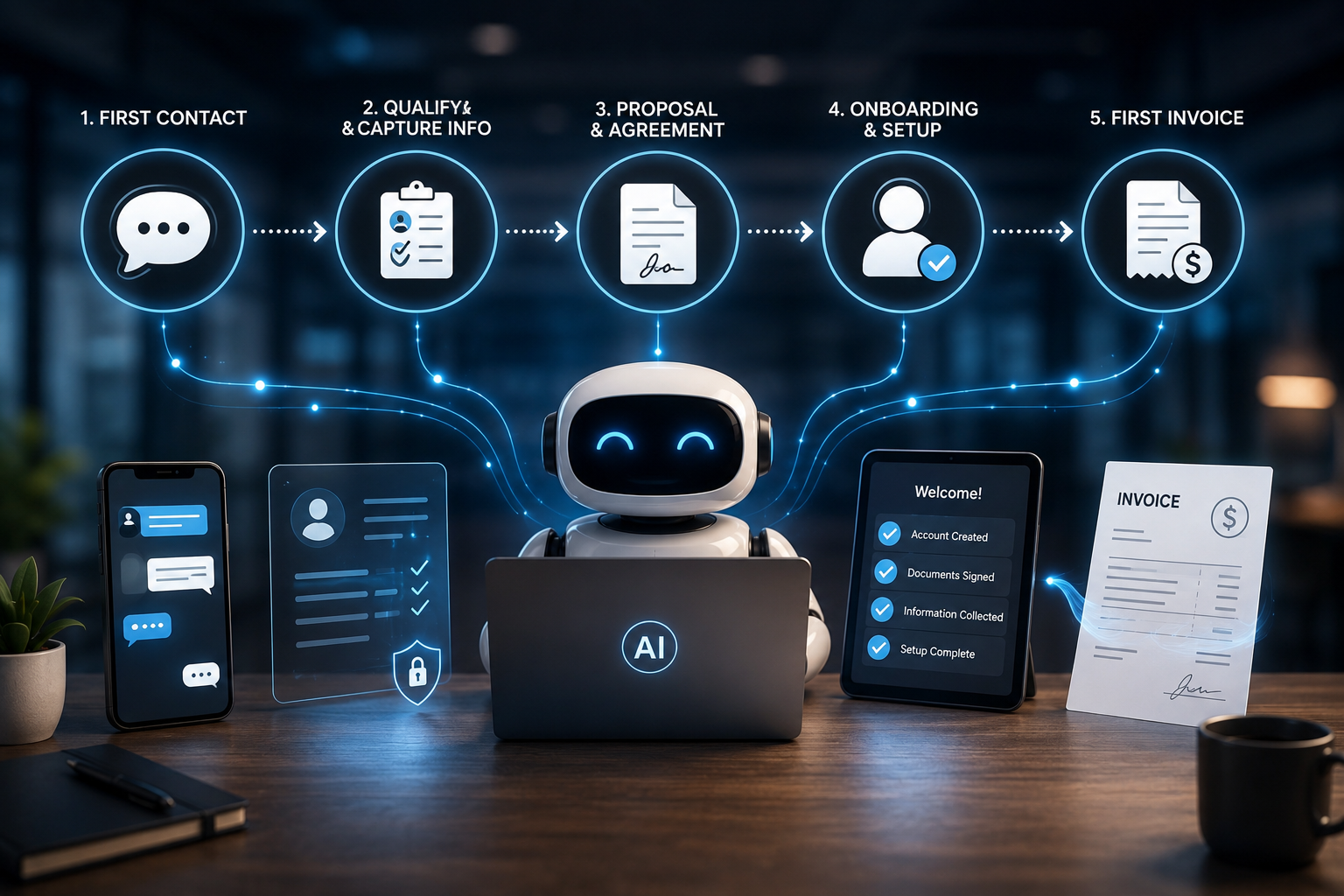
- The Full System: From First Contact to First Invoice
- Stage 1: Capture and Qualify the Lead Instantly
- Stage 2: Contract and Payment, Same Day
- Stage 3: The Intake Questionnaire That Actually Gets Used
- Stage 4: Turn Raw Answers Into a Real Project Brief
- Stage 5: Schedule the Kickoff Without the Email Ping-Pong
- Stage 6: Automated, Specific Check-Ins
- Stage 7: Invoice, Automatically, the Moment Work Wraps
- The Best Tools for Each Stage
- A Real Workflow, Start to Finish
- Prompts You Can Steal
- Mistakes That Undo All of This
- Frequently Asked Questions
- Your Move
- Sources
That stung more than losing a pitch. I hadn’t lost her to a better freelancer. I’d lost her to my own disorganization.
If you run any kind of service business — freelance, agency, consulting, coaching — you already know the feeling. The sale is the fun part. What happens in the week after the sale is where good clients quietly slip away, and it’s rarely because your work isn’t good enough. It’s because the gap between “yes, let’s work together” and “okay, we’re actually working together” is wider and messier than it needs to be.
This is the exact gap AI automation is built to close. Not by replacing the personal touch that makes people want to work with you, but by making sure nothing falls through the cracks while you deliver it. Below is the complete system I now use — and the one I wish I’d had before I lost that client.
Why the First 90 Days Decide Everything
Here’s the uncomfortable number: close to half of all client churn happens within the first 90 days of the relationship — before your actual work has had time to prove itself. Research from Moxo’s 2026 State of Churn report puts it at roughly 43%, and the Customer Success Association attributes a meaningful chunk of that early departure directly to poor onboarding, not poor delivery.
Read that again, because it’s the whole argument for this article. Clients rarely leave because you did bad work. They leave because the first two weeks felt disorganized, slow, or confusing — and by the time you deliver something great, they’ve already mentally checked out.
The speed of onboarding itself is a leading predictor. Data from OnboardMap’s first-30-days benchmarking found that clients who complete intake within 48 hours retain above 85%, while clients whose intake drags past ten days retain below 50%. That’s not a small gap. That’s the difference between a business that keeps its clients and one that’s constantly refilling a leaky bucket.
And the businesses that fix this aren’t necessarily working harder — they’re automating the parts that don’t need a human touch so the parts that do need one (the actual relationship, the actual work) get their full attention. Firms that send automated, specific reminders during onboarding — the kind that name the exact missing document instead of a vague “just checking in” — see completion rates roughly 60% higher than firms relying on manual follow-up, according to OnboardMap’s 2026 benchmark report. Separately, teams using automated onboarding workflows have reported early churn dropping by around 25%, per UserGuiding’s 2026 analysis.
None of this requires a bigger team. It requires a system — and in 2026, AI is what makes that system buildable by one person in an afternoon instead of a developer in a month.
What “AI Onboarding Automation” Actually Means
Let’s separate two things that get lumped together, because the distinction matters.
Onboarding automation is the plumbing — the sequence of steps that happen automatically once a client signs: sending the contract, triggering the intake form, scheduling the kickoff call, generating the invoice. This part has existed for years through tools like Zapier and dedicated CRMs.
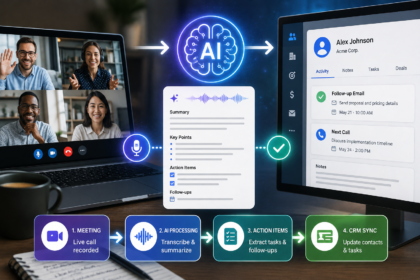
AI is what makes that plumbing think. Instead of just moving a form response into a spreadsheet, AI can read the answers, draft a personalized welcome email that actually references what the client said, turn a messy intake form into a clean project brief, or flag if a client’s answers suggest scope creep before the project even starts.
Put together, you get an onboarding sequence that doesn’t just move data around — it makes the client feel like you dropped everything for them, while you actually did none of the typing. A new client fills out an intake form → AI reads it and drafts a warm, specific welcome email referencing their goals → a contract and invoice go out automatically → a kickoff call gets scheduled → you review the AI’s project brief over coffee and add your own notes. Total hands-on time: maybe ten minutes.
The goal isn’t to remove yourself from the relationship. It’s to remove yourself from the paperwork so the relationship gets the time it deserves.
The Full System: From First Contact to First Invoice
Here’s the seven-stage system, in order. You don’t need to build all seven at once — start with whichever stage currently causes you the most pain, then work outward.
Stage 1: Capture and Qualify the Lead Instantly
The moment someone fills out your contact form or books a call, the clock starts. Set up a trigger so that submission immediately does three things: logs the lead in your CRM or spreadsheet, tags it by service type or budget range, and fires an AI-drafted reply that references what they actually asked for — not a generic “thanks for reaching out.”
This single stage matters more than people think. A slow first reply signals disorganization before the relationship has even begun, and that first impression is disproportionately sticky.
Stage 2: Contract and Payment, Same Day
Once a lead becomes a “yes,” don’t let the contract sit in a draft folder. Use a tool that generates the agreement from a template, sends it for e-signature, and collects the deposit or first payment in the same link — no separate emails, no chasing.
This is also where AI earns its keep quietly: it can pre-fill contract details from the intake conversation, flag any terms that don’t match your standard scope (a common source of the “wait, I thought this included X” conversation later), and remind the client automatically if the signature is still pending after 48 hours.
Stage 3: The Intake Questionnaire That Actually Gets Used
Most intake forms are either too short to be useful or so long that clients abandon them halfway through. AI helps you split the difference: build one focused form, and let an AI step ask smart, conditional follow-up questions based on how the client answers — so a simple project gets a simple form, and a complex one gets pulled deeper without you manually building ten different form versions.
Stage 4: Turn Raw Answers Into a Real Project Brief
This is the stage that used to eat my Sunday nights. A client fills out an intake form, and somebody — usually me, usually late — has to turn scattered answers into an actual project brief with scope, timeline, and deliverables.
Feed the raw intake answers into an AI tool with a clear prompt (see the templates below) and it will draft a structured brief in seconds: goals, scope, what’s included, what’s explicitly not included, and a proposed timeline. You read it, correct anything off, and it’s done. This is also your best defense against scope creep — a clearly written brief the client agreed to is worth more than any awkward mid-project conversation about “extra” work.
Stage 5: Schedule the Kickoff Without the Email Ping-Pong
Connect a scheduling tool directly to the “contract signed” trigger so the client picks their own kickoff slot from your live availability the moment they sign — no “does Tuesday work for you?” thread. AI can draft a short pre-call agenda based on their intake answers so the call itself starts with substance instead of small talk.
Stage 6: Automated, Specific Check-Ins
This is the stage most businesses skip, and it’s the one the data says matters most. Set automated check-ins at fixed points — day 3, day 14, day 30 — that reference specific milestones rather than generic “just checking in” messages. AI can draft these based on where the project actually stands, pulling from your project management tool if you’ve connected one.
The specificity is what makes this work. “Have you had a chance to send over the logo files we need for Friday?” gets a response. “Just checking in, hope all is well!” gets ignored — or worse, quietly resented.
Stage 7: Invoice, Automatically, the Moment Work Wraps
When a milestone or the full project is marked complete, trigger an invoice automatically instead of writing “I’ll send that over this week” and forgetting for eleven days. Pair it with an automatic reminder if it goes unpaid after seven days, so chasing payment stops being a task on your list at all.
The Best Tools for Each Stage
You don’t need ten subscriptions. Most of this system runs on one or two tools plus a general AI assistant for the drafting work. Here’s how the main options break down for 2026.
| Tool | Best for | Free tier | Where it shines |
|---|---|---|---|
| HoneyBook | Creatives who want fast setup | Trial only | Proposals, contracts, and payment in one client-facing link |
| Dubsado | Freelancers who want deep customization | Trial only | Highly flexible workflow automation; also works well outside the US |
| Plutio | Solo operators who want one connected tool | No | Proposal → project → invoice in a single client workspace |
| Bonsai | US-based freelancers | Limited | Contracts, invoicing, and built-in tax estimation |
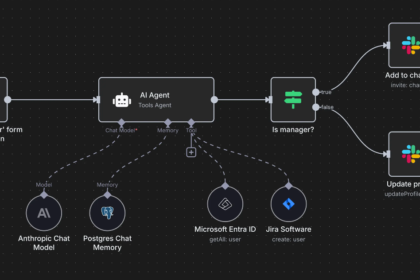
| Zapier or n8n | Anyone stitching custom tools together | Yes | Connecting your intake form, CRM, calendar, and AI drafting in one pipeline |
| A general AI assistant (Claude, ChatGPT, etc.) | The “thinking” layer | Yes | Drafting welcome emails, project briefs, and check-in messages from raw intake data |
If you’re already using Zapier or n8n for other parts of your business — our guide on Zapier + AI and n8n for content businesses cover the setup in more depth — you can plug an onboarding pipeline directly into that same hub instead of adding another standalone tool.
A Real Workflow, Start to Finish
Here’s what this actually looks like once it’s running, using the setup I use for my own client work:
- A prospect books a discovery call through my scheduling link. The booking triggers a CRM entry and a short AI-drafted confirmation email referencing what they wrote in the “what do you need help with” field.
- After the call, I mark the lead as “won” with one click. That triggers the contract and a 50% deposit invoice, sent as a single link.
- The moment the contract is signed, an intake form goes out automatically, and a kickoff-call scheduling link appears in the same email — the client picks their own slot.
- When the intake form comes back, an AI step drafts a full project brief from the raw answers and drops it into my project management tool as a draft. I review it over coffee, adjust the scope language, and approve it.
- Three days before the kickoff call, an automated reminder goes out. The day after the call, I send the approved brief for a final sign-off — this is the client’s clear “yes, this is what we agreed on” moment.
- Automated check-ins fire at day 3, 14, and 30, each referencing the actual current milestone rather than a generic template.
- When I mark the project complete, the final invoice goes out automatically, with a payment reminder queued for seven days out if needed.
From the client’s side, it feels like white-glove service — fast replies, a clear plan, nothing forgotten. From my side, it’s maybe fifteen minutes of actual typing across the entire onboarding process. Everything else runs while I do the work that actually needs me.
Prompts You Can Steal
The quality of what AI drafts for you comes down almost entirely to how specific your instructions are. Here are three I use constantly — copy, tweak, and plug in your own details.
For the welcome email:
“You’re a warm, professional assistant for a [your industry] business. Write a welcome email to a new client based on this intake form: [paste answers]. Reference at least one specific thing they mentioned. Keep it under 150 words, friendly but not overly casual, and end with a clear next step.”
For the project brief:
“Turn this raw client intake form into a structured project brief with four sections: Goals, Scope (what’s included), Out of Scope (what’s explicitly not included), and Proposed Timeline. Use plain language, flag anything ambiguous with a [CLARIFY] tag instead of guessing, and keep it under 400 words. Intake answers: [paste].”
For the check-in message:
“Write a short check-in message to a client at the [day 14 / day 30] mark of a project. Reference this specific current status: [paste project status]. Ask one clear question that moves the project forward. Avoid generic phrases like ‘just checking in’ — be specific about what you need from them.”
Mistakes That Undo All of This
Automating a messy process. If your current onboarding is confusing on paper, automating it just makes the confusion arrive faster. Map the steps clearly first — then automate.
Skipping the human review step. AI drafts are a starting point, especially for anything with legal or financial weight, like contract terms or scope language. Always read before you send, at least until you’ve seen the workflow perform reliably for a few clients.
Making the first touch feel robotic. The whole point of adding AI here is to make the client feel more cared for, not less. If your automated welcome email reads like a template, rewrite the prompt until it doesn’t.
Ignoring the specificity rule on check-ins. Generic “just checking in” messages perform worse than no message at all — they read as noise. Every automated touchpoint should reference something real and current.
Never revisiting the system. Client needs change, tools update, and what worked for your first five clients might create friction at client fifty. Review the workflow every quarter, not just when something breaks.
Frequently Asked Questions
Do I need to know how to code to set this up? No. Every tool mentioned here — HoneyBook, Dubsado, Plutio, Zapier, n8n — is built around visual, no-code setup. The hardest part isn’t technical; it’s being honest about what your current process actually looks like, step by step, before you automate it.
How much does this cost to set up? You can start close to free. Most CRMs in this space run $20–$40/month for a solo operator, and general AI assistants have usable free tiers for the drafting work. Compare that against the cost of losing even one client to a disorganized first two weeks, and the math tends to justify itself quickly.
Will clients notice — or mind — that AI is involved? Not if you do it well. Clients don’t care what tool drafted the first version of their welcome email; they care that it was fast, specific, and clearly about them. The automation should be invisible. What they should notice is how organized and responsive you seem — which, ironically, is the opposite of how “automated” usually feels.
Is it safe to put client information into AI tools? Use reputable platforms with clear data policies, and avoid feeding highly sensitive financial or legal details into general-purpose AI tools unless the platform specifically states it’s built for that. For most service businesses, project scope, goals, and preferences carry low risk — but always check a tool’s data handling policy before connecting client information.
How long does it take to build this system? The first version — welcome email plus contract automation — can be running by the end of a single afternoon. The full seven-stage system, done properly with testing, usually takes a focused week if you’re building it around client work rather than dropping everything to do it.
What if I only have a handful of clients a year — is this overkill? It’s actually where it matters most. With low volume, every single client’s first impression carries outsized weight, and you have the least room to let one slip through the cracks. You don’t need the full system — even automating just the welcome email and the contract-to-invoice link removes the two biggest points of friction.
Your Move
I think about that lost client more than I’d like to admit. Not because losing one client sank my business — it didn’t — but because it was so obviously preventable. She didn’t leave because of my work. She left because my process told her, without either of us saying it out loud, that she wasn’t a priority.
You don’t need all seven stages running by tomorrow. Pick the one that’s currently costing you the most — probably the gap between “contract signed” and “work actually starts” — and automate just that this week. Watch how it feels when a new client gets a fast, specific, organized welcome instead of radio silence while you catch up on the rest of your inbox.
The businesses winning quiet client loyalty in 2026 aren’t the ones with the fanciest offer. They’re the ones where nothing falls through the cracks in the first two weeks — and increasingly, that’s not a talent. It’s a system.
Sources
- Moxo, The State of Churn and Retention in B2B Organizations 2026
- OnboardMap, Client Onboarding Benchmarks 2026: Top vs. Bottom Performers
- UserGuiding, 2026 analysis on automated onboarding workflows and early churn, cited via Strategic Micro Systems
- GigRadar, Client Retention Strategies + Free Churn Calculator (2026)
- SundaySky, 50 Customer Onboarding Statistics for Better CX in 2026
- Plutio, Best Client Onboarding Software for Freelancers (2026)
- Plutio, Best Client Management Software for Freelancers (2026)
This article is part of UseAIPulse’s AI Automation coverage, alongside our guides on Zapier + AI, building AI agents without coding, and automating customer support with AI chatbots.