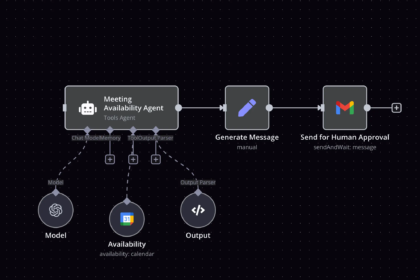



You can build an AI agent without code by choosing a no-code platform, giving the agent one clear job, connecting it to the tools it needs and testing it with a human in the loop. The whole process can take an afternoon. This guide walks you through each step, with a real example you can copy toda
y.
What Is an AI Agent and How Is It Different From Regular Automation?
An AI agent is a piece of software that can understand a goal, decide what steps to take and use tools to get it done. Instead of following a rigid script, it reads the situation, makes a choice and acts. Think of it as a digital assistant that can think through a task, not just repeat one.
A traditional automation works like a train on tracks. When a form is submitted, copy the data to a spreadsheet. The path never changes, and if something unexpected appears, the automation breaks or does nothing.
An agent works more like a capable intern. You give it a goal, such as “research this new lead and tell me if they are a good fit,” and it figures out the steps: read the message, check the company website, compare it with your ideal client, write a summary and suggest a reply.
This matters because many real tasks are messy. Emails are written in different styles, customers ask unusual questions and data arrives in inconsistent formats. Agents handle that variety far better than fixed rules.
The good news for beginners is that you no longer need programming skills. Modern no-code tools let you describe the agent in plain English, connect your apps with a few clicks and watch it work. If you have already tried workflow tools, our guide on how to use Zapier and AI to save 20 hours a week is a great starting point before you move to agents.
AI Agents vs. Chatbots vs. Workflows
These three terms are often mixed up, so it helps to separate them clearly. Each solves a different kind of problem, and the best setups often combine them.
- A chatbot talks with people. It answers questions in a conversation, but it usually can’t take actions in other apps on its own.
- A workflow moves information between apps by following fixed rules: when X happens, do Y. It is fast, cheap and predictable.
- An agent pursues a goal. It can read information, decide what to do next, use several tools and adjust when something changes.
A simple rule helps you choose. If the task has the same steps every time, use a workflow. If the task needs judgment, reading or writing, use an agent. If people need to talk to it, add a chatbot interface.
For example, saving a new customer’s details to your CRM is a workflow. Deciding whether that customer is worth a call and drafting a personal reply is an agent’s job. Answering their first questions on your website is a chatbot’s job, which we cover in our guide to automating customer support with AI chatbots.
In practice, you will often start with a workflow and add an agent step where judgment is needed. That keeps your system reliable and your costs under control.
What a Beginner Agent Can Realistically Do
There is a lot of hype around agents, so it is important to set realistic expectations. Today’s no-code agents are very good at focused, low-risk tasks and less reliable at open-ended, high-stakes ones.
Tasks that work well for a first agent:
- Research and summarizing: reading a website, article or document and producing a short brief.
- Sorting and tagging: labeling emails, support tickets, leads or feedback by topic or urgency.
- Drafting: writing first versions of replies, social posts, reports or meeting follow-ups.
- Data extraction: pulling names, dates, amounts or requests out of messy text.
- Routing: deciding which person, folder or tool should handle an incoming item.
- Monitoring: watching a source such as reviews or mentions and alerting you to what matters.
Tasks to avoid at the start:
- Spending money or sending payments without approval.
- Sending messages to customers with no human review.
- Legal, medical or financial decisions.
- Deleting or changing important data with no backup.
Agents can make mistakes, misread instructions or sound confident while being wrong. That is why the best beginner approach is “agent drafts, human approves.” You get most of the time savings with very little of the risk.
How to Build an AI Agent Without Code, Step by Step
Building your first agent is much easier than most people expect. The key is to keep it small. Pick one task, one outcome and a handful of tools, then improve it over time.
The table below compares the main types of no-code platforms. Features and pricing change quickly, so check each tool’s current plans before you decide.
| Platform type | Examples | Strengths | Best for |
|---|---|---|---|
| Workflow tools with AI steps | Zapier, Make | Huge app libraries, easy to learn | Adding AI judgment to existing automations |
| Open-source or self-hostable builders | n8n | Flexible, powerful, good control over data | Users who want more customization |
| Dedicated agent builders | Lindy, Relevance AI, Gumloop | Agent-first design and templates | Quick setup of assistants with several tools |
| Chat assistants with custom instructions | ChatGPT custom GPTs, Claude Projects | Simple, no integrations needed | Research, writing and personal assistants |
The takeaway: choose the platform that already connects to the apps you use. The best tool is the one that reaches your email, calendar, CRM or spreadsheet without extra work.
Follow these steps to build your first agent:
- Pick one painful, repetitive task. Look for something you do several times a week that involves reading or writing. Examples include qualifying leads, summarizing feedback or triaging messages.
- Define the goal and the finish line. Write one sentence: “When X arrives, the agent should produce Y.” If you can’t describe the output clearly, the agent won’t produce it consistently either.
- List the tools it needs. Decide which apps the agent must read from and write to, such as Gmail, Google Sheets, your CRM, Slack or a website. Fewer tools mean fewer errors.
- Choose your platform. Use the table above. If you already use Zapier or n8n, begin there. If you prefer a guided experience, try a dedicated agent builder.
- Write clear instructions. This is the most important step. Tell the agent its role, its goal, the tools it can use, the rules it must follow and the exact format of its answer.
- Connect the apps and set the trigger. Choose what starts the agent, such as a new form entry, a new email or a scheduled time. Give it only the permissions it really needs.
- Add a human approval step. Have the agent send its draft or decision to you in Slack, email or a spreadsheet for review before anything goes to a customer.
- Test with real examples. Run at least ten to twenty real cases, including odd ones. Read the results, fix the instructions and repeat until the output is consistently useful.
- Launch small and monitor. Start with a limited volume. Review the agent’s work daily at first, then weekly, and relax the approval step only when it earns your trust.
To make this concrete, here is an agent you can build in a single session.
Example: a lead research agent
- Trigger: a new contact form submission arrives.
- Step 1: the agent reads the message and the visitor’s company website.
- Step 2: it compares what it finds with your ideal client description.
- Step 3: it scores the lead as high, medium or low fit and explains why in two sentences.
- Step 4: it drafts a personalized reply that you can edit.
- Step 5: it saves the contact, score and draft to your CRM or spreadsheet.
- Step 6: it notifies you in Slack or email, so you can approve or change the reply with one click.
This agent replaces ten minutes of research per lead with a thirty-second review. If you receive twenty leads a week, that is more than three hours saved weekly, and your replies become faster and more consistent.
A simple template for your agent’s instructions:
- Role: “You are a research assistant for a small consulting business.”
- Goal: “Evaluate each new lead and draft a helpful reply.”
- Context: describe your services, your ideal client and your tone of voice.
- Tools: list exactly what the agent may read and write.
- Rules: “Never promise prices. If information is missing, say so. If unsure, flag it for a human.”
- Output format: specify the headings or fields you want, such as fit score, reasoning and draft reply.
The more specific your instructions, the better your results. Add two or three examples of good outputs, because examples teach an agent your standards faster than long explanations.
Guardrails that keep your agent safe:
- Least privilege: give access only to the data and actions the agent needs.
- Approval for external actions: require a human to approve emails, payments and public posts.
- Clear fallback: tell the agent to ask for help instead of guessing.
- Logging: keep a record of what the agent did, so you can audit mistakes.
- Privacy checks: avoid sending sensitive personal or client data to tools without reviewing their data policies.
- Spending limits: set caps on usage, because agents that loop can run up costs.
Common mistakes beginners make:
- Starting too big. A “do everything” agent usually does nothing well. Begin with one task.
- Vague instructions. “Handle my inbox” is not a goal. “Sort new emails into four labels” is.
- Skipping tests. Real-world messages are messier than your imagination.
- Trusting outputs blindly. Always verify facts, numbers and links in the early weeks.
- Ignoring costs. Check how your platform charges for runs and AI usage.
How to measure whether your agent is worth it:
- Time saved per week compared with doing the task manually.
- Accuracy rate: how often you approve the output without changes.
- Response time: how quickly leads, customers or tasks are handled.
- Cost per task: platform and AI fees divided by the number of tasks.
- Error count: how often a human has to correct or reject the result.
Once your first agent is stable, you can copy the pattern to other jobs, such as sorting your inbox with our email triage workflow or building a content pipeline like the one in our n8n guide for content businesses. Our roundup of the top AI automation workflows for solopreneurs also has ideas for your second and third agents.
Frequently Asked Questions About Building AI Agents Without Code
Do I need programming skills to build an AI agent?
No. No-code platforms let you describe the agent in plain language and connect apps through menus. Understanding your own process matters far more than coding knowledge.
How long does it take to build a first agent?
A simple agent can be working in a few hours. Expect extra time for testing, since refining the instructions with real examples is what makes the difference between a toy and a useful tool.
How much does it cost?
Many platforms have free or low-cost starter plans, though costs grow with the number of tasks and the AI usage. Check current pricing, set usage limits and calculate the cost per task before scaling.
Are AI agents safe to use with business data?
They can be, if you are careful. Review each provider’s privacy and security policies, give agents minimal access, avoid sensitive information unless the tool is approved for it and keep humans in charge of important decisions.
Will an AI agent replace my job or my team?
For beginners and small businesses, agents are best understood as helpers that remove repetitive work. They free you to focus on strategy, relationships and creative work that still need human judgment.
What is the best first task to give an AI agent?
Choose something frequent, low-risk and based on reading or writing, such as summarizing messages, sorting incoming requests or drafting replies for your review. These tasks give quick wins and teach you how agents behave.
Conclusion
Learning to build an AI agent without code is one of the most valuable skills for solopreneurs and small teams right now. You don’t need a technical background. You need a clear task, good instructions and a careful testing process.
Remember the formula: pick one repetitive task, define a clear goal, connect only the tools you need, keep a human approving the results and improve with real feedback. Start with a workflow you trust and add an agent where judgment is needed.
This week, choose one task that drains your time and build a small agent for it. Test it, refine it and measure the hours it saves. Once it works, you will have a repeatable pattern you can use again and again to grow your business without growing your workload.