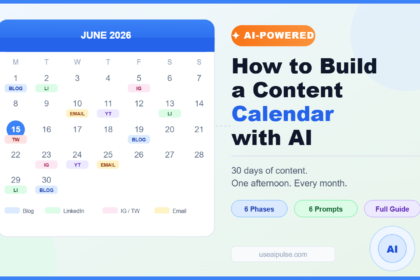



To build a content calendar with AI, you start with your goals and audience, use AI to generate and sort topic ideas, assign each idea a format and a date, and keep a simple spreadsheet as your single source of truth. Done right, you can plan a full month in about one afternoon. Here’s exactly how.
Why You Need a Content Calendar (and Why AI Makes It Easier)
Let’s start with a familiar scene. It’s Sunday night, you promised yourself you’d publish something this week, and you’re staring at a blank page wondering what to write. You scroll through social media for “inspiration,” lose forty minutes and end up posting nothing.
Sound familiar? You’re not lazy. You’re just missing a plan.
A content calendar is simply a schedule that shows what you’ll publish, where, when and why. It can live in a spreadsheet, a notes app or a project board. It doesn’t have to be pretty. It has to exist.
The benefits are bigger than most people expect. A calendar helps you stay consistent, which matters because audiences and search engines both reward creators who show up regularly. It helps you connect your content to real goals instead of random ideas. And it takes the daily “what do I post?” stress off your plate.
So where does AI come in? Planning is exactly the kind of work AI handles well. It can brainstorm dozens of topic ideas in seconds, group them into themes, suggest formats and even draft a first version of the schedule. What used to take a whole weekend can now take an afternoon.
There’s one important rule, though: AI can suggest, but you decide. It doesn’t know your audience’s real struggles, your business priorities or what you’re genuinely excited to talk about. Your judgment turns a generic list into a plan that works.
If you’re still building your overall system, our complete AI content creation playbook shows how the planning piece fits with writing, editing and publishing.
The Real Cost of Winging It
Publishing without a plan feels flexible, but it quietly costs you in several ways.
- Inconsistency. Weeks of silence followed by a flurry of posts confuse your audience and make it harder to build momentum.
- Scattered messaging. Without themes, your content jumps between topics and people can’t tell what you’re about.
- Last-minute quality. Rushed posts are usually the weakest ones. Good ideas need time to be researched and edited.
- Missed opportunities. Holidays, product launches, seasonal searches and industry events pass by because nobody saw them coming.
- Burnout. Making decisions every single day is exhausting. Planning once and executing many times is easier on your brain.
- Wasted effort. A great article can’t be repurposed into videos, emails and social posts if you didn’t plan for it.
Here’s a simple way to see the difference. Imagine two creators. One decides daily what to publish and spends 30 minutes each time just choosing a topic. The other plans a month in one session. Over 20 working days, the first has burned about ten hours on decisions alone. The second spent a single afternoon and then simply got to work.
That’s not a magic number, just a sketch of how the time adds up. The point is that planning in batches protects your energy for the creative part.
A calendar also makes your content strategic. Instead of asking “what should I post today?”, you ask “which question does my audience need answered this week?” That shift alone improves quality.
What AI Can (and Can’t) Plan for You
Before you open your AI tool, it helps to know where it shines and where it needs supervision.
What AI does well:
- Brainstorming topics. Give it your niche and audience, and it will produce a long list of ideas in seconds.
- Grouping ideas into themes. It can sort a messy list into clear categories and content pillars.
- Matching ideas to formats. It can suggest whether a topic works best as a blog post, short video, newsletter, carousel or podcast episode.
- Building the schedule. It can spread ideas across weeks while balancing topics and formats.
- Drafting titles and hooks. You’ll get plenty of options to pick from.
- Creating briefs. It can turn each idea into a short outline you can hand to yourself, a freelancer or another AI step.
- Finding gaps. It can point out topics your audience may care about that you haven’t covered.
What you still need to do yourself:
- Know your audience. Real questions from comments, emails, customer calls and search data beat anything an AI guesses.
- Choose what matters. Only you know your business goals and capacity.
- Check for demand. An idea that sounds great might have no one searching for it. Verify with Search Console, keyword tools or audience feedback.
- Add experience and opinion. The most memorable content comes from your stories, mistakes and point of view.
- Be realistic about time. AI will happily schedule seven posts a week. You may only have time for two.
- Check dates and facts. Holidays, events and statistics should always be verified.
Think of AI as a sharp planning assistant who has read a lot but has never met your customers. Useful, yes. In charge, no.
How to Build a Content Calendar With AI, Step by Step
Here’s the practical part. You’ll need a spreadsheet (Google Sheets works great), an AI assistant, about two to three hours and a rough idea of your goals. If you prefer Notion, Trello or Airtable, the same steps apply.
First, set up the calendar itself. The table below shows the columns I recommend. It looks like a lot, but each one saves you from a problem later.
| Column | What it’s for | Example |
|---|---|---|
| Publish date | Keeps you on schedule | March 4 |
| Content pillar | Connects the piece to your core themes | Beginner tutorials |
| Working title | Makes the idea clear at a glance | How to Start a Podcast on a Budget |
| Format | Decides the type of content | Blog post |
| Channel | Shows where it will be published | Website and email |
| Target keyword or topic | Helps with search and focus | start a podcast cheap |
| Goal | Defines success for this piece | Grow email subscribers |
| Call to action | Tells readers what to do next | Download the free equipment checklist |
| Status | Tracks progress | Idea, drafting, editing, scheduled, published |
| Owner | Clarifies who is responsible | You |
| Notes and links | Stores research, sources and related posts | Link to the checklist page |
The takeaway: a good calendar answers three questions for every piece: what is it, who is it for and what should happen next. If you can fill those in, you’re set.
Follow these steps to build your calendar:
- Define your goal for the next 30 days. Be specific. “Grow my newsletter by 200 subscribers” or “publish four helpful guides that bring search traffic” works better than “get more visibility.” Your goal shapes every other choice.
- Describe your audience in plain words. Write a short paragraph: who they are, what they struggle with, what they’ve already tried and what they want. The more real details you include, the better the AI’s suggestions will be.
- Choose three to five content pillars. Pillars are the main themes you’ll return to, such as “beginner tutorials,” “tool reviews,” “case studies” and “behind the scenes.” You can ask the AI to suggest pillars, then trim them to the ones that fit your brand.
- Gather real audience questions. Pull them from blog comments, emails, direct messages, customer support, forums and Search Console queries. Paste them into the AI and ask it to group them by theme. This step makes your calendar based on what people actually ask.
- Generate a big list of ideas. Ask the AI for 40 to 60 topic ideas across your pillars, using your audience description and the real questions you collected. Quantity matters here, because you’ll cut the weak ones next.
- Filter and prioritize. Delete anything off-brand, repetitive or boring. Then score the rest from one to five on three things: audience demand, fit with your goal and how excited you are to create it. Keep the top ideas.
- Check search demand where it matters. For blog and video ideas you want to be found, test the main phrase in a keyword tool or Search Console and look at the search results. If top results look very different from your idea, adjust the angle. Our guide on writing SEO content with AI that actually ranks goes deeper.
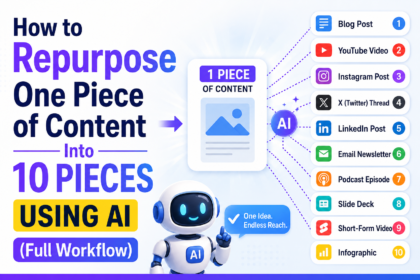
- Assign formats and channels. Decide the main format for each idea, then plan how it will travel. A single guide might become a newsletter, a few short videos and several social posts. Our workflow for repurposing one piece of content into ten shows how.
- Set a realistic publishing rhythm. Start with what you can sustain. Two quality posts a week beat five rushed ones. Leave space for the unexpected, and plan a few lighter pieces for busy weeks.
- Drop ideas onto the calendar. Ask the AI to propose a schedule, then review it yourself. Balance the pillars, alternate heavy and light content, and place time-sensitive pieces first. Add holidays, launches and events you already know about.
- Create a short brief for each piece. For every entry, write the goal, audience, main points, sources and call to action. AI can draft these, and you edit them. A strong brief makes drafting faster, as shown in our guide to writing an AI content brief.
- Batch your production. Don’t write one post at a time. Do research for several in a row, then drafting, then editing, then visuals. Batching reduces the mental cost of switching tasks.
- Add a buffer. Keep two or three finished pieces in reserve so a sick day doesn’t break your streak.
- Review weekly and adjust monthly. Look at what performed, what flopped and what you enjoyed making. Then feed those lessons into the next month’s plan.
That might look like a long checklist, but the first time is the slowest. After one or two cycles, you’ll move through it quickly.
To see how it fits together, imagine a small creator who teaches budget cooking. Her goal is to grow her newsletter. Her pillars are quick dinners, meal prep, pantry basics and money-saving tips. She feeds the AI her subscriber questions and gets 50 ideas. She cuts them to 12, adds search checks, assigns each one to a blog post with a short video and a newsletter mention, and fills a four-week sheet. By the end of the afternoon, she has a month planned and her first two posts outlined.
Prompts you can use while planning:
- “Here is my audience description and their most common questions. Group the questions into five themes and name each theme.” This builds your pillars.
- “Generate 50 content ideas for these themes. Mix beginner, intermediate and advanced topics. Avoid generic titles.” This fills your idea bank.
- “For each idea, suggest the best format and explain why in one sentence.” This saves decision time.
- “Here is my top idea list and my available time. Build a four-week calendar with two posts per week, balanced across themes.” This creates a draft schedule.
- “Write a one-paragraph brief for each of these titles, including goal, audience, key points and a call to action.” This prepares you to write.
- “What important topics or questions are missing from this plan?” This helps you find gaps.
- “Give me five alternative titles for this idea that are specific, honest and not clickbait.” This improves headlines.
One more tip: always paste in your real information rather than asking the AI to imagine it. The more your own data, the less generic the results.
Keeping the calendar human:
- Leave room for spontaneity. Reserve one slot a week for something timely or personal.
- Plan stories, not just topics. Add a note about a real experience you can include in each piece.
- Protect your voice. Create a short style guide so every AI draft sounds like you. Our guide to building an AI content style guide walks you through it.
- Mix content types. Combine educational posts with personal ones, opinions and behind-the-scenes updates.
- Review every AI suggestion with a skeptical eye. If an idea doesn’t make you curious, your audience won’t be either.
Common mistakes to avoid:
- Overloading the calendar. A plan you can’t follow is worse than no plan. Start smaller than you think you should.
- Copying AI ideas without validation. Some ideas sound great and have no audience.
- Ignoring your goal. Content without a purpose creates traffic that doesn’t help your business.
- Planning only for one channel. Think about how each idea can be reused elsewhere.
- Never reviewing results. A calendar should evolve based on real data.
- Forgetting fact-checks and edits. Planning doesn’t replace quality control.
- Making it too complicated. If you dread opening the spreadsheet, simplify it.
Metrics to review each month:
- Publishing consistency: how many planned pieces you actually shipped.
- Traffic and reach: visits, views, impressions and followers by channel.
- Engagement: comments, shares, replies, saves and time on page.
- Conversions: newsletter sign-ups, leads, sales or whatever your goal was.
- Best performing pillars and formats: double down on what works.
- Time spent per piece: check whether your batching is actually saving effort.
Look at the numbers without judgment. A flop isn’t failure; it’s information. Use it to plan better next month.
If video is part of your plan, our guides on creating YouTube scripts with AI and the best AI tools for short-form video will help you turn calendar entries into finished content. For social channels, see how to build an AI-powered social media strategy from scratch.
Finally, think in cycles. Plan one month in detail and sketch the next two roughly. That gives you direction without locking you into ideas that may not make sense in six weeks.
Frequently Asked Questions About Building a Content Calendar With AI
How far ahead should I plan my content calendar?
A detailed plan for the next 30 days and a rough outline for the following two months works well for most people. It’s specific enough to act on and flexible enough to change when something unexpected happens.
How often should I publish?
Choose the frequency you can keep up with for at least three months. Consistency matters more than volume. For many solo creators, one to three quality pieces a week is plenty.
Can AI create my whole content calendar automatically?
It can produce a solid draft quickly, but it shouldn’t be the final version. You need to check ideas against real audience needs, adjust for your capacity and add the personal touches that make your content yours.
What is the best tool for a content calendar?
The best tool is the one you’ll actually open. Google Sheets is simple and free. Notion, Trello and Airtable offer more visual layouts. Start simple, and upgrade only when your process outgrows the spreadsheet.
How do I make sure AI-generated ideas aren’t generic?
Give it specific inputs: your audience’s real questions, your experience, your products and examples of content you’re proud of. Ask for unusual angles and reject anything that sounds like it could belong to anyone.
What should I do when I fall behind my calendar?
Don’t panic and don’t try to catch up by rushing. Drop the least important items, move deadlines and use your buffer content. Then adjust next month’s plan so it matches your real capacity.
Conclusion
A content calendar won’t write your articles or film your videos, but it removes the part that drains most creators: constantly deciding what to do next. When you build a content calendar with AI, you get a fast brainstorming partner and a clear schedule, while you keep control of the ideas that matter.
Here’s the short version. Set a clear goal, understand your audience, pick a few pillars, collect real questions, let AI generate and organize ideas, validate the best ones, assign formats and dates, write simple briefs and review your results every month. Keep it realistic and keep it human.
You don’t need to plan perfectly. Block out a single afternoon this week, open a blank spreadsheet and plan your next four weeks. Then publish the first piece. Momentum is built one finished post at a time, and a good plan makes the next one so much easier.