

There is no single trick that reliably spots AI-generated content in 2026, so the best method is to stack several checks: look for provenance labels, scan for visual and audio clues, verify the source, and slow down before you share. Detection tools help, but none of them gives a perfect verdict, and the most convincing fakes no longer have obvious flaws.
- Why It Is So Hard to Spot AI-Generated Content Now
- Start With Provenance: Content Credentials and Invisible Watermarks
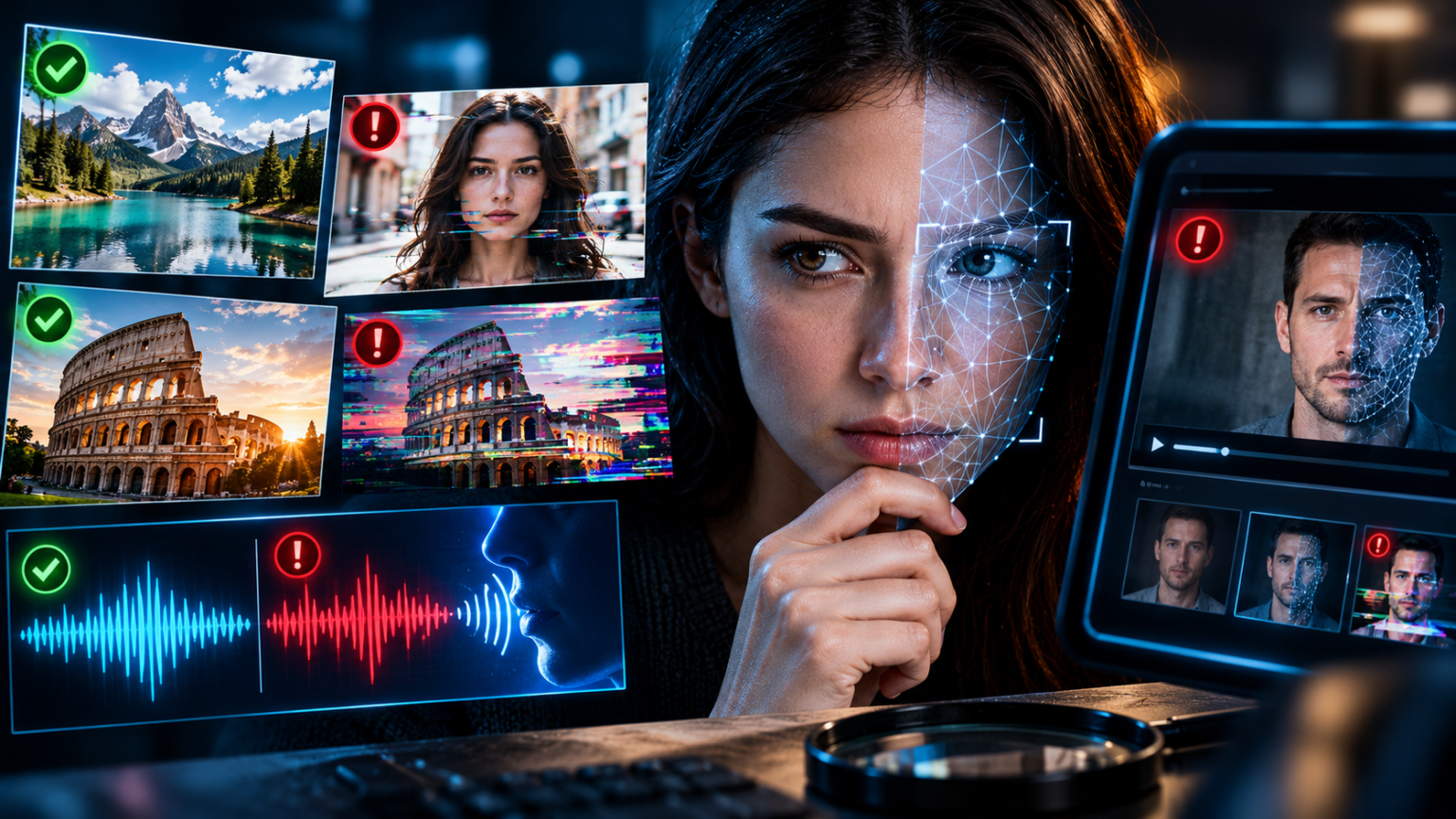
- How to Spot AI-Generated Images
- How to Spot AI-Generated Videos and Deepfakes
- How to Spot AI Voices and Voice-Cloning Scams
- A Simple Step-by-Step Method to Check Anything Suspicious
- How AI Text Fits In: Hallucinations and Fake Articles
- What Platforms and Governments Are Doing
- Frequently Asked Questions About Spotting AI-Generated Content
- Can I always tell if an image is AI-generated?
- Do AI detector websites work?
- What is the “CR” icon on images?
- Does a missing watermark mean an image is real?
- How can I tell if a voice on the phone is cloned?
- Are AI-generated images illegal?
- What should I do if I find a fake that targets me or someone I know?
- Conclusion: Slow Down, Verify, and Stay Curious
This beginner’s guide explains how AI-made images, videos, and voices work, which warning signs still help, which tools are worth using, and the simple habits that protect you from being fooled.
Why It Is So Hard to Spot AI-Generated Content Now
A few years ago, you could spot most AI images in seconds. Hands had extra fingers, faces looked waxy, and text turned into gibberish. Today’s tools have fixed many of those mistakes, and new versions arrive every few months.
That does not mean you are helpless. It means the old advice, “look for weird hands,” is no longer enough on its own.
What Counts as AI-Generated or Synthetic Media
Synthetic media is any image, video, or audio created or heavily altered by AI. It comes in several forms:
- AI images created from a text description, such as a photo-style picture of an event that never happened.
- AI video clips generated from text or from a single photo, including realistic scenes and talking faces.
- Deepfakes, which swap or edit a real person’s face or voice to make them appear to say or do something they did not.
- Voice clones, which copy how a person sounds from a short audio sample.
- AI text, which can write convincing articles, reviews, and messages.
Not all synthetic media is harmful. Artists, marketers, and teachers use it every day. The problem starts when it is presented as real.
Why Fakes Spread So Quickly
Fake content spreads for three reasons. First, the tools are cheap and easy, so anyone can produce realistic material. Second, social media rewards shocking posts, so emotional content travels faster than careful corrections. Third, many people share first and check later, especially when a post confirms what they already believe.
If you want to understand the terms used in this guide, our AI glossary for beginners explains them in plain English.
The Big Idea: Check the Source, Not Just the Pixels
Here is the most useful mindset shift. Instead of asking, “Does this look real?” ask, “Where did this come from, and can I confirm it somewhere else?” A perfect-looking fake can still be exposed by its source, while a rough-looking real photo can be confirmed by trustworthy reporting.
Start With Provenance: Content Credentials and Invisible Watermarks
The most reliable checks do not rely on your eyes. They rely on information that the creator tool attaches to the file.
What Are Content Credentials (C2PA)?
Content Credentials are a labeling system built on a standard called C2PA, short for the Coalition for Content Provenance and Authenticity. When a supported tool creates or edits an image, it can attach a signed record that says which software was used, when, and whether AI was involved. Think of it like a digital nutrition label.
Many major AI image tools and editing programs now attach these credentials, and some platforms show a small “CR” badge on labeled content. You can also upload a file to a Content Credentials verification tool to read the record.
The main weakness is that credentials can be missing. Screenshots, re-uploads, and some social platforms strip the information. A missing label does not prove an image is real.
What Is SynthID?
SynthID is an invisible watermark developed by Google. It changes an image, video, or audio file in tiny ways that humans cannot see or hear, but software can detect. It is designed to survive common edits such as cropping and compression.
Google has said that billions of items have been marked this way, and other companies have begun adopting it. Detection tools are becoming available in some Google products and through dedicated portals, though rollout and coverage are still expanding.
The key limitation is coverage. A watermark only exists if the tool that made the content added one. Many images come from open-source models that carry no watermark at all.
How to Use These Labels in Real Life
- If you find a label saying the content was made with AI, treat that as strong evidence.
- If you find no label, that tells you very little. Keep checking.
- If a platform shows an “AI-generated” tag, believe the tag, but do not assume untagged content is real.
| Check | What it tells you | Strength | Main limitation |
|---|---|---|---|
| Content Credentials (C2PA) | Origin and editing history of a file | High when present | Often stripped or missing |
| SynthID watermark | Whether supported tools generated or edited it | High for supported tools | Does not cover every AI tool |
| Platform AI labels | Whether the uploader or platform flagged it | Medium | Depends on honesty and detection |
| AI detector websites | A probability guess | Medium to low | Can be wrong in both directions |
| Your own eyes and ears | Visible or audible flaws | Low and getting lower | Good fakes have few flaws |
How to Spot AI-Generated Images
Provenance labels come first, but you should also learn the visual clues. They are not proof, but they help you decide when to investigate further.
Check the Details People Often Miss
Look closely at these areas:
- Hands, teeth, and ears. Fingers may blend, teeth may look uneven, and earrings may not match.
- Text in the background. Signs, labels, and book covers may contain garbled or nonsensical letters.
- Jewelry, glasses, and clothing patterns. Straps, frames, and patterns may change shape or merge into skin.
- Reflections and shadows. Light may fall in inconsistent directions, or reflections may not match the scene.
- Background crowds. Faces in the distance may look distorted, duplicated, or oddly smooth.
Look at the Overall “Feel”
AI images often look slightly too perfect: very smooth skin, dramatic lighting, and flawless composition. Real photos usually include small imperfections, such as uneven lighting, clutter, or awkward framing. This is a hint, not a rule, since professional photographers and heavy photo filters also create polished results.
Run a Reverse Image Search
A reverse image search is one of the most useful steps. Upload the image or paste its link into a reverse search tool, and see where else it appears. You may find the original source, an earlier version, a fact-check, or evidence that the image came from an art or AI gallery.
Also ask a simple question: if this event were real, would trustworthy news outlets be reporting it? A dramatic photo with no credible coverage is a warning sign.
Use AI Detectors Carefully
Several websites claim to tell you whether an image is AI-generated. Independent tests show these tools can be helpful but imperfect, with accuracy that varies by image type and generator. They can also flag real photos as fake, especially if the photo was heavily edited or compressed.
Treat a detector result as one clue, not a verdict. If two or three different methods agree, your confidence should rise. If they disagree, stay uncertain.
If you are curious how these images are made in the first place, see our comparison of the best AI image generators.
How to Spot AI-Generated Videos and Deepfakes
Video adds motion, sound, and context, which gives you more clues but also more ways to be fooled.
Watch the Face and the Edges
With face-swap deepfakes, look for:
- Blurry or shifting edges around the face, hairline, or jaw, especially when the head turns.
- Lip movements that do not quite match the words.
- Eyes and blinking that look unnatural or stuck.
- Lighting mismatches between the face and the rest of the scene.
- Glitches when something passes in front of the face, such as a hand or glass.
Check the Physics and Continuity
Fully AI-generated clips may break the rules of the real world. Objects may change shape, hands may merge with items, background details may shift between frames, and motion can look floaty. Short clips often look better than long ones, so be extra careful with very short, perfect-looking videos shared without context.
Listen to the Audio
Audio can reveal problems, such as flat emotion, odd pauses, a voice that sounds too clean, or background noise that loops. But modern voice cloning can be very convincing, so audio clues alone are not enough.
Look for the Original Footage
Many viral videos are real clips with a false caption. Others are older footage shared as if it were new. Search for the key moment, check the date, and look for the original uploader or a news report. If you cannot find any original source, treat the video as unverified.
Know How AI Videos Are Made
Understanding the technology helps you stay skeptical. Our guides to the best AI video generators and AI avatar and talking-head tools show how realistic these clips can look.
| Clue | Common in | How reliable | What to do |
|---|---|---|---|
| Blurry face edges | Face-swap deepfakes | Medium | Pause and zoom in |
| Lip-sync mismatch | Deepfakes and AI avatars | Medium | Watch the mouth closely |
| Warped objects or shifting details | Fully AI-generated clips | Medium | Check several frames |
| Flat or looped audio | Cloned voices | Low | Do not rely on it |
| No original source found | Any fake or misleading clip | High | Treat as unverified |
| Dramatic claim with no news coverage | Any fake or misleading clip | High | Wait for confirmation |
How to Spot AI Voices and Voice-Cloning Scams
Voice cloning is where fake media becomes personal. A scammer can copy a voice from a short clip and call you pretending to be a relative, a boss, or a bank worker.
Why Voice Clues Are Not Enough
A good clone can sound exactly like someone you know, even over a bad phone line. Because people are stressed in emergencies, they rarely notice small flaws. That is why technical clues are weak protection compared with good habits.
The Behavior Test
The most reliable warning signs are about the request, not the sound:
- Pressure to act right now with no time to think.
- A demand for secrecy, such as “do not tell anyone.”
- An unusual payment method, like gift cards, crypto, or wire transfers.
- A change of channel, such as moving to a private chat app.
If you notice any of these, hang up and call the person back on a number you already have.
Set Up a Family Safe Word
Choose a random phrase that only your family knows, and use it to confirm identity during any emergency call. Do not share it online, and ask the caller to say it first.
Verify Before You Send Money or Information
Never send money or share codes based only on a voice or a video call. Confirm through a second channel, such as a text to a known number or a call to the official line of the organization.
A Simple Step-by-Step Method to Check Anything Suspicious
You do not need to be a technical expert. Follow this routine whenever something looks surprising, shocking, or too good to be true.
- Pause. Strong emotion is a signal to slow down, not to share.
- Check the label. Look for AI tags, Content Credentials, or a platform warning.
- Find the source. Who posted it first, and are they trustworthy?
- Search for coverage. Look for reports from several reliable outlets.
- Run a reverse image search or search key phrases from the clip.
- Inspect the details in the image, video, or audio.
- Use a detector as a clue, not a final answer.
- Decide how sure you are, and only share if you are confident or clearly label it as unverified.
When to Be Extra Careful
Be especially careful with content about elections, disasters, wars, celebrities, health claims, and investment offers. These topics attract fake media because they trigger strong reactions and can influence real decisions.
What If You Cannot Tell?
That is fine. “I am not sure” is a valid answer. If you cannot verify something, do not share it as fact. Wait for reliable confirmation, or share it with a clear note that it is unconfirmed.
| Step | Time needed | Tool needed | What it helps you avoid |
|---|---|---|---|
| Pause before sharing | 1 minute | None | Spreading emotional fakes |
| Check labels and credentials | 2 minutes | Verification tools | Missing clear AI tags |
| Reverse image search | 2 minutes | Free search tool | Recycled or fake images |
| Search for news coverage | 3 minutes | Search engine | Unverified claims |
| Use a detector | 2 minutes | Free or paid website | Obvious AI content, as one clue |
| Confirm by another channel | 5 minutes | Phone or messages | Voice and video scams |
How AI Text Fits In: Hallucinations and Fake Articles
AI does not only create images and voices. It also writes text that can sound authoritative while being wrong. Chatbots sometimes state false facts or invent sources, a problem known as hallucination. Our guide to why AI gets things wrong explains how to catch these mistakes.
Signs of Low-Quality AI Text
Look for vague claims with no sources, repeated phrases, generic advice, and facts that sound plausible but cannot be confirmed. Be careful with product reviews and news-style sites that publish large volumes of similar articles.
Do Not Rely on “AI Text Detectors”
Tools that claim to detect AI writing are especially unreliable. They can wrongly accuse human writers and miss edited AI text. Judge text by its sources, accuracy, and usefulness, not by a detector score.
What Platforms and Governments Are Doing
You are not alone in this fight. Technology companies, platforms, and regulators are building systems to make synthetic media easier to identify.
Labels and Provenance Standards
Major AI companies and software makers have adopted Content Credentials, and several have joined or expanded the C2PA effort. Watermarking systems such as SynthID are spreading across more tools. These efforts will help, but they are not complete, because open-source tools and bad actors can skip labels.
Platform Rules and New Laws
Many social platforms now require creators to disclose realistic AI content, and some add automatic labels. Governments are also moving toward rules on transparency. In the European Union, the AI Act includes requirements for marking AI-generated content, with obligations phasing in over time.
These measures reduce confusion, but enforcement is uneven. Your own checking habits remain the strongest defense.
Frequently Asked Questions About Spotting AI-Generated Content
Can I always tell if an image is AI-generated?
No. Many AI images look completely real, and detection tools are imperfect. The best approach combines labels, source checks, reverse image search, and common sense.
Do AI detector websites work?
They can be useful as a clue, but they are not reliable enough to settle an important question. They sometimes miss AI content and sometimes flag real photos as fake, so use them alongside other checks.
What is the “CR” icon on images?
It indicates that the file carries Content Credentials, a provenance record showing how it was made and edited. You can inspect it with a verification tool, if the label is available.
Does a missing watermark mean an image is real?
No. Many AI tools do not add watermarks, and screenshots or re-uploads can strip labels. A missing watermark tells you very little.
How can I tell if a voice on the phone is cloned?
You often cannot tell by sound alone. Focus on the request: pressure, secrecy, and unusual payment methods are red flags. Hang up and call back on a number you trust, and use a family safe word.
Are AI-generated images illegal?
Creating AI images is legal in most cases. Problems arise when they are used for fraud, harassment, defamation, or non-consensual content. Laws vary by country and are changing quickly.
What should I do if I find a fake that targets me or someone I know?
Save evidence such as links and screenshots, report the content to the platform, and tell the person affected. For fraud, contact your bank and local authorities. For serious abuse, consider legal help.
Conclusion: Slow Down, Verify, and Stay Curious
AI-generated media is now part of everyday life, and it will keep improving. You cannot rely on spotting glitches with your eyes, but you do not need to. Labels, source checks, reverse searches, and a simple pause before sharing will protect you from most fakes.
Use provenance tools when they are available, treat detectors as clues, and trust the process more than the pixels. Teach your family the safe word habit, and remember that it is perfectly fine to say, “I cannot verify this.”
If you remember one idea, make it this: ask where something came from before you ask whether it looks real. Try the step-by-step method on the next surprising post you see, and you will build a habit that serves you for years.
This article is for general information only and is not legal or professional advice. AI tools, detection methods, and regulations change quickly, so confirm details with official sources and trusted fact-checkers before relying on them.