


For a long time, I treated every piece of content like a one-time event. I’d spend hours on a video or a long article, publish it once, and immediately start staring at a blank page for the next thing. Meanwhile, I kept seeing other creators post constantly, everywhere, without seeming to work ten times harder than I did.
- Why Repurposing Beats Creating From Scratch
- What You Need Before You Start
- The Full AI Repurposing Workflow
- The 10 Formats, Explained
- A Prompting Trick That Makes Repurposed Content Feel Original
- Common Mistakes That Make Repurposed Content Feel Repetitive
- How to Build a Simple Repurposing Schedule
- Frequently Asked Questions
- Doesn’t repurposed content just feel like the same thing over and over?
- Do I need different AI tools for different formats?
- How much of the work can AI actually do here?
- Will this hurt my SEO if the same ideas appear on multiple platforms?
- What if my source content is short — can I still repurpose it?
- How long does the full workflow take once I’ve done it a few times?
- Your Next Move
The gap wasn’t effort. It was that they were publishing one real idea ten different ways, and I was publishing ten different ideas once each. Once I switched to repurposing with AI doing the heavy lifting, my output didn’t just increase — it got more consistent, because I stopped needing a fresh idea every single day.
Why Repurposing Beats Creating From Scratch
The math behind repurposing is simple and easy to underestimate until you actually try it. A single well-developed idea — a strong opinion, a useful process, a lesson learned the hard way — usually contains enough material for a long-form piece, several short posts, a handful of social captions, and an email, because the idea itself doesn’t change. Only its length, format, and framing do.
Creating from scratch every time means solving two hard problems repeatedly: coming up with something worth saying, and figuring out how to say it. Repurposing lets you solve the first problem once, thoroughly, and then use AI to solve the second problem quickly, over and over, for each format. That’s the entire reason this workflow saves as much time as it does — you’re not cutting corners on substance, you’re eliminating redundant effort on packaging.
What You Need Before You Start
This workflow doesn’t require a content team or expensive software. You need:
- One genuinely solid source piece. A blog post, a video, a podcast episode, or even detailed notes from something you already know well. Thin source material produces thin repurposed content, no matter how good your prompts are.
- A capable AI chat assistant. Any modern general-purpose model handles this well; the workflow depends far more on how you prompt than which specific tool you use.
- Fifteen extra minutes for editing. Repurposing is fast, but the editing pass is what keeps ten pieces of content from all sounding like the same paragraph with different line breaks.
The Full AI Repurposing Workflow
Follow these steps in order. The sequence matters — jumping straight to “generate everything” is the single biggest reason repurposed content ends up feeling hollow.
Step 1: Choose the Right “Source” Piece
Not everything is worth repurposing. The best source content has a clear central idea, at least one specific example or piece of evidence, and some kind of opinion or takeaway — not just a neutral summary of facts. If your source piece is thin on any of these, strengthen it first rather than repurposing weak material into ten weak pieces.
Step 2: Extract the Core Ideas First
Before generating anything, ask the AI to pull out the source material’s core structure rather than jumping straight to new formats. A useful prompt looks like:
“Read this piece and list the 3–5 core ideas, the single strongest quote or line, and the main takeaway a reader should walk away with. Don’t rewrite anything yet — just extract.”
This step does two things. It confirms the source piece actually has enough substance to repurpose, and it gives you a short, reusable list of the ideas worth carrying into every other format, so nothing important gets lost or reworded into blandness along the way.
Step 3: Turn Ideas Into a Written Repurposing Map
With the core ideas extracted, ask the AI to sketch which idea fits which format, rather than assuming every format should cover everything. For example:
“Based on these core ideas, suggest which idea or angle would work best for a short-form video hook, which for a LinkedIn post, which for an email, and which for a Twitter/X thread. One idea per format, not all of them crammed into each.”
This mapping step is what keeps the ten final pieces from feeling like ten copies of the same summary. Each format gets its own angle, pulled from the same source material but not repeating it wholesale.
Step 4: Generate Each Format One at a Time
Exactly like drafting a blog post section by section, generate one repurposed format per request rather than asking for all ten at once. A single massive prompt tends to flatten every format into the same generic tone. One focused request per format, referencing the specific angle from your map, produces sharper, more distinct results for each one.
Step 5: Adjust Tone and Length for Each Platform
A LinkedIn post, a Twitter/X thread, and an Instagram caption aren’t just different lengths of the same text — they carry different tones by convention. Ask explicitly for that shift:
“Rewrite this as a LinkedIn post: slightly more professional tone, short paragraphs, one clear lesson, no hashtag spam.”
Skipping this step is why so much repurposed content reads as obviously cross-posted rather than genuinely native to each platform.
Step 6: Edit for Platform Fit, Not Just Grammar
The final editing pass isn’t about catching typos — it’s about confirming each piece would actually make sense to someone who only ever sees that one format, with no context that you also published a long-form piece elsewhere. If a caption only makes sense next to the original video, it needs another pass.
The 10 Formats, Explained
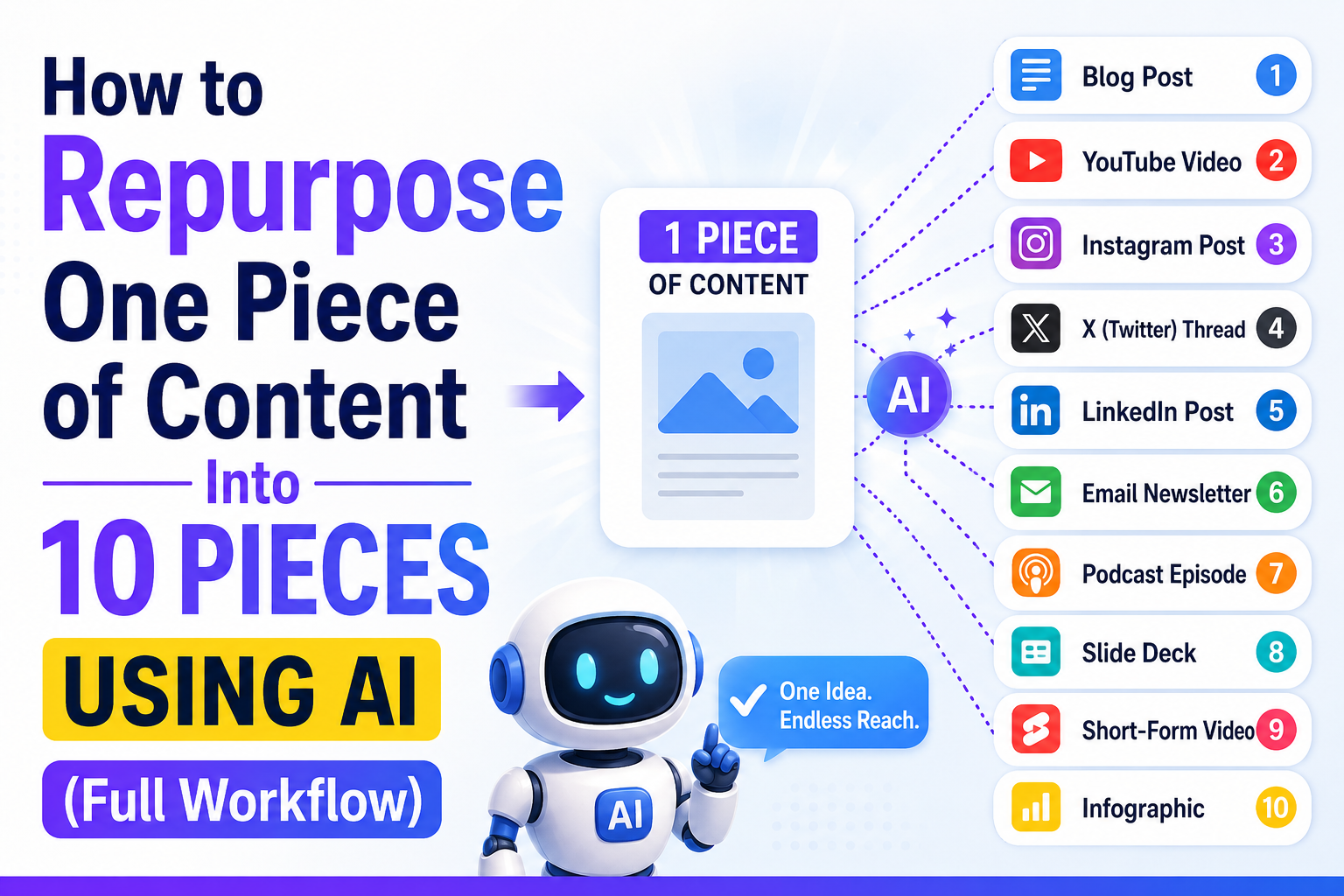
Once you have a solid source piece and a repurposing map, here’s a realistic set of ten formats that one piece of content can reasonably become:
- The original long-form piece — your blog post, video, or podcast episode.
- A short-form video script — one specific angle or hook pulled from the source, built for 30–60 seconds.
- A carousel post — the source’s steps or main points broken into slide-sized chunks.
- A LinkedIn post — a single lesson or opinion, written in a more professional, first-person voice.
- A Twitter/X thread — the core argument broken into a numbered sequence of short, punchy points.
- An email newsletter section — a more personal, conversational retelling aimed at people who already know you.
- A quote graphic — the single strongest line from the source, pulled out and framed as its own visual.
- A discussion-style community post — the idea reframed as a question or debate starter for a forum or group.
- A short blog recap or summary post — a condensed version linking back to the full source piece.
- A follow-up piece answering a question the original raised — often the easiest “new” content to create, because the audience already told you what they’re curious about in the comments.
Not every source piece needs to become all ten. Picking the four or five formats that actually fit your audience and your platforms will get you more consistent results than mechanically forcing every piece through the full list.
A Prompting Trick That Makes Repurposed Content Feel Original
The single most useful habit here is telling the AI what’s different about the new format’s audience, not just what format you want. Compare:
- Weak: “Turn this into a Twitter thread.”
- Strong: “Turn this into a Twitter thread for people scrolling quickly who’ve never seen the original piece — assume zero context, hook them in the first line, and make each tweet stand on its own.”
The second version forces the AI to actually adapt the content for a different reader’s context and attention span, rather than just reformatting the same sentences with line breaks. That distinction is the difference between content that feels repurposed and content that feels native to each platform.
Common Mistakes That Make Repurposed Content Feel Repetitive
Generating everything from one giant prompt. This is the fastest way to get ten pieces that all read like the same summary in different clothes. Go format by format.
Skipping the platform-specific tone adjustment. A post that reads exactly the same on LinkedIn and Twitter signals to regular followers of both that they’re seeing the same thing twice, which trains them to skip your content on one platform entirely.
Repurposing thin source material. If the original piece didn’t have much substance, no amount of clever reformatting will create ten genuinely valuable pieces out of it. Fix the source, not the repurposing.
Publishing all ten formats on the same day. Spacing repurposed content out, even by just a few days, prevents your audience from noticing the same idea showing up everywhere at once — and gives each format room to actually perform on its own.
Forgetting to update the call-to-action per platform. A “read the full post” link makes sense in an email or a blog recap; it makes far less sense at the end of a short video where the goal is usually to keep someone watching, not send them away.
How to Build a Simple Repurposing Schedule
A sustainable rhythm beats a burst of ten pieces followed by nothing for two weeks. A realistic approach is to publish one solid source piece per week, then spread its repurposed formats across the days that follow — a short-form video two days later, a LinkedIn post the day after that, an email recap by the end of the week. This keeps a steady publishing cadence without requiring a new original idea every single day, which is the exact problem repurposing is meant to solve.
Frequently Asked Questions
Doesn’t repurposed content just feel like the same thing over and over?
It does if you skip the platform-specific adaptation step, but it doesn’t have to. The repurposing map and platform-specific prompting in this workflow are specifically designed to give each format its own angle and tone, pulled from the same source without repeating it verbatim.
Do I need different AI tools for different formats?
No. A single capable general-purpose AI assistant can handle text-based repurposing across nearly all of these formats. Some people prefer specialized tools for video scripts or graphic generation specifically, but that’s a convenience choice, not a requirement.
How much of the work can AI actually do here?
AI handles the reformatting, tone shifting, and first-draft generation for each piece extremely well. What it can’t do is choose which ideas are actually worth repurposing or verify that a claim still holds up outside its original context — that judgment stays with you.
Will this hurt my SEO if the same ideas appear on multiple platforms?
Generally no, as long as you’re not publishing identical text across multiple owned websites, which can create duplicate content issues. Publishing the same underlying idea across different platforms in different formats — a video, a social post, an email — is standard practice and isn’t treated as duplicate content the way copy-pasting the same article to two blogs would be.
What if my source content is short — can I still repurpose it?
You can, but expect fewer formats to work well. A short piece with one solid idea might reasonably become three or four strong repurposed pieces rather than ten; forcing it into every format on this list usually produces some noticeably thin results.
How long does the full workflow take once I’ve done it a few times?
After the first couple of attempts, most people can extract ideas, build a repurposing map, and generate three or four solid repurposed pieces in well under an hour, not counting the time to create the original source piece itself.
Your Next Move
Pick one piece of content you’ve already published — something you’re proud of that didn’t get the reach it deserved. Run it through the extraction step, build a quick repurposing map, and generate just three new formats from it this week rather than trying to hit all ten on your first attempt.
You’ll likely find that the hardest part was never having enough ideas. It was treating every idea as disposable after its first appearance. Once you start repurposing deliberately, the ideas you already have start working a lot harder for you.