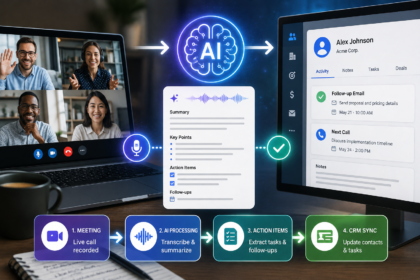


If a customer messages you at 2 a.m. asking where their order is, you have two options: pay someone to be awake, or let software answer instantly for a few cents. That second option is no longer a developer-only luxury. Today you can automate customer support with an AI chatbot — no code required — in an afternoon, using tools that train themselves on your existing help docs.
- What “no-code AI chatbot support” actually means
- Why automate customer support with AI
- What a no-code chatbot can (and can’t) handle
- How to automate customer support with an AI chatbot (no code): step by step
- Best no-code AI chatbot platforms in 2026
- Best practices (and the mistakes that sink most bots)
- Frequently asked questions
- The bottom line
The economics are hard to argue with. A human agent handles a routine query for roughly $6 to $12; an AI chatbot handles the same query for about $0.50. Well-implemented deployments typically cut first-year support costs by 30–40%, and Gartner expects conversational AI to reduce global contact-center labor costs by $80 billion in 2026 alone. This guide walks you through exactly how to do it yourself — no engineers, no budget approvals, no jargon.
What “no-code AI chatbot support” actually means
A no-code AI chatbot is a customer support assistant you build through a visual, drag-and-drop interface instead of programming. You point it at your knowledge base — FAQs, help articles, product pages, return policy — and it learns to answer questions in your brand’s voice. When a question is too complex or sensitive, it hands the conversation to a human.
The key distinction in 2026 is between a rule-based bot (follows rigid scripts, breaks the moment a customer phrases something unexpectedly) and a generative AI chatbot (understands intent and context, then answers from your content). The latter is what you want, and it’s now the default on most no-code platforms.
The market reflects how mainstream this has become. According to Grand View Research, the global chatbot market was estimated at roughly $9.56 billion in 2025 and is projected to keep climbing through the early 2030s, with customer service the single largest application segment. Translation: your competitors are already doing this.
Why automate customer support with AI
Beyond the per-ticket savings, the wins compound:
- 24/7 instant responses. Most customers expect an immediate reply, and AI delivers it at 3 a.m. as readily as at 3 p.m.
- Deflection of repetitive tickets. Tightly scoped bots routinely resolve 60–80% of routine queries (order status, password resets, hours, shipping), freeing your team for conversations that actually need a human.
- Faster resolution. Klarna’s AI assistant cut average resolution time from 11 minutes to under 2 — and handled two-thirds of its support volume.
- Lean scaling. You can triple inbound volume without tripling headcount.
A realistic expectation matters here: the industry-average AI resolution rate sits around 45%, but small businesses with a narrow, well-trained bot regularly hit 80%+ on the specific queries they cover. Scope beats ambition.
What a no-code chatbot can (and can’t) handle
Great fits: order tracking, FAQs, return/refund policy, business hours and location, appointment booking, lead capture, basic troubleshooting, and routing tickets to the right team.
Keep humans in the loop for: billing disputes, account security issues, angry or emotional customers, and anything requiring judgment. The data is blunt about why — customers will switch brands after just two bad chatbot experiences, so a confident wrong answer is worse than a clean handoff.
The goal isn’t to remove humans. It’s to remove humans from the boring 70% so they can be brilliant on the important 30%.
How to automate customer support with an AI chatbot (no code): step by step
Step 1 — Map your most common questions
Pull the last 100–200 support tickets, emails, or chats and group them. You’ll usually find that 10–15 question types cover the overwhelming majority of volume. This list is the blueprint for everything that follows — and it tells you exactly what your bot needs to nail before launch.
Step 2 — Pick a no-code platform
Choose based on where your customers actually contact you (website, WhatsApp, Instagram, email) and your budget. See the comparison table below.
Step 3 — Train it on your knowledge base
Modern no-code tools let you “feed” the bot by uploading a help-doc URL, a PDF, or a sitemap. The AI ingests it and can answer from it within minutes. If your help content is thin, this step doubles as a reason to finally write those FAQ pages — they help your SEO too.
Step 4 — Build flows and escalation rules
Set up the handful of guided flows that need structure (e.g., “Track my order” → ask for order number → return status). Critically, define your escalation rule: when the bot is unsure or detects frustration, it should route to a human or open a ticket. Never let a bot loop a frustrated customer.
Step 5 — Connect your channels
Embed the chat widget on your site and connect any messaging channels your audience uses. A single platform can usually run your website, WhatsApp, and Instagram from one dashboard.
Step 6 — Test like a real customer
Try to break it. Ask questions in slang, with typos, and out of order. Confirm the handoff to a human works. Confirm it never invents policies you don’t have — accuracy is everything, since transparency and correctness are what keep AI satisfaction scores high.
Step 7 — Launch, measure, and improve
Go live, then watch three numbers weekly: resolution rate (how many chats the bot closed without a human), escalation rate, and customer satisfaction (CSAT). Review the questions it failed, add those answers to your knowledge base, and your resolution rate climbs every month.
Best no-code AI chatbot platforms in 2026
| Platform | Best for | Free tier | Notable strength |
|---|---|---|---|
| Tidio (Lyro) | Small businesses & e-commerce | Yes | Easy setup, strong support + sales blend |
| Chatbase | Training a bot on your own docs | Trial | Fast “feed it a URL” knowledge training |
| Botpress | Builders who want flexibility | Yes (500 msgs/mo) | Visual builder + multiple AI models |
| ManyChat | WhatsApp / Instagram / Messenger | Yes | Best for social & messaging-first brands |
| Intercom (Fin) | Scaling support teams | No | High resolution rate, deep helpdesk integration |
| Zendesk AI | Mid-size to enterprise | No | No-code workflow automation at high volume |
For most small businesses and solo founders, start with Tidio or Chatbase — you can have a working bot live the same day. Move up to Intercom or Zendesk only when ticket volume justifies the cost.
Best practices (and the mistakes that sink most bots)
- Disclose that it’s AI. Hidden bots score lower on satisfaction; honesty builds trust.
- Scope tightly at first. A bot that perfectly answers 12 questions beats one that vaguely attempts 100.
- Always offer an exit to a human. One obvious “talk to a person” path prevents rage-quits.
- Update relentlessly. Treat failed questions as your roadmap.
- Match your brand voice. Generic, robotic copy is a missed branding opportunity.
If you’re building out a broader automation stack, it’s worth pairing your chatbot with the other AI tools that are reshaping how small businesses operate — email, scheduling, and review collection automate beautifully alongside support.
Frequently asked questions
Do I really need zero coding skills to set this up? Yes. Platforms like Tidio, Chatbase, and Botpress are built around visual editors and “upload your help docs” training. If you can use a website builder or a spreadsheet, you can build a support chatbot.
How much does it cost to automate customer support with an AI chatbot? Several tools have free tiers for low volume. Paid plans for small businesses typically run from around $20 to $100+ per month depending on conversation volume and channels. Compared to a human handling tickets at $6–$12 each, most businesses recover the cost quickly.
How long does it take to go live? A focused bot trained on existing FAQs can be live the same day. Plan a few days to a week for testing, refining flows, and setting up clean human handoff before a full launch.
Will an AI chatbot replace my support team? No — and it shouldn’t. It’s best at deflecting the repetitive 60–80% of tickets so your team focuses on complex, high-value, or emotional conversations. The strongest setups are hybrid: AI first, humans for everything that needs judgment.
What’s a realistic resolution rate? The cross-industry average is around 45%, but a tightly scoped small-business bot often resolves 80%+ of the specific questions it’s trained on. Narrow scope and good knowledge content are the biggest levers.
Which channels can a no-code chatbot work on? Most platforms deploy to your website out of the box, and many also connect to WhatsApp, Instagram, Facebook Messenger, and email — managed from a single dashboard.
How do I stop the bot from giving wrong answers? Train it only on accurate, current content; set it to escalate to a human when uncertain; and review failed conversations weekly to patch gaps. Never let it improvise policies you don’t actually have.
Is it secure to handle customer data this way? Reputable platforms offer enterprise-grade security and compliance (GDPR, SOC 2, and similar). Check the provider’s certifications before connecting any customer data, especially in regulated industries like finance or healthcare.
The bottom line
You no longer need a developer or a big budget to automate customer support with an AI chatbot — no code required. Map your top questions, pick a no-code platform, train it on your existing help content, set a clean human handoff, and improve it weekly. Start narrow, measure your resolution rate, and expand from there. Within a week you can be answering customers instantly, around the clock, at a fraction of the cost — and giving your team back the hours they’re currently spending on “where’s my order?”