


A year ago, building an AI agent meant hiring a developer or spending weeks buried in Python tutorials. That’s no longer true. In 2026, I can spin up a working AI agent that answers emails, qualifies leads, or researches topics in under an hour — without writing a single line of code.
- What Is an AI Agent (In Plain English)?
- Why 2026 Is the Best Year to Start
- What You Can Actually Build Without Code
- The Best No-Code AI Agent Builders in 2026
- How to Build Your First AI Agent Without Coding: Step-by-Step
- Common Mistakes Beginners Make (And How to Skip Them)
- How to Turn Your AI Agents Into Income
- Frequently Asked Questions
- Do I really need zero coding experience to build AI agents in 2026?
- How much does it cost to build an AI agent without coding?
- How long does it take to build my first agent?
- Are no-code AI agents reliable enough for real business use?
- Which no-code platform should a complete beginner start with?
- Is it safe to connect my email and other accounts to an AI agent?
- What’s the difference between an AI agent and a chatbot?
- Your Move
If you’ve been watching everyone talk about “AI agents” and quietly wondering whether you missed the boat, you didn’t. This guide walks you through exactly how to build AI agents without coding in 2026, which tools are worth your time, and a simple step-by-step process you can follow today.
Let’s get into it.
What Is an AI Agent (In Plain English)?
An AI agent is software that can think through a goal, make decisions, and actually do things on its own — not just chat back at you.
A regular chatbot answers a question and stops. An AI agent takes a goal like “find me five qualified leads and add them to my spreadsheet,” then breaks that into steps, uses the right tools, and completes the task without you babysitting every click.
The simplest way I explain it to friends: a chatbot talks, an agent works.
Under the hood, every no-code agent you build will combine four things:
- A language model (the brain — usually GPT, Claude, or Gemini)
- Instructions (what you want it to do and how it should behave)
- A knowledge base (your documents, notes, or data it can pull from)
- Tool connections (email, calendars, spreadsheets, CRMs, and so on)
You don’t program any of this. You configure it through visual menus and plain-English instructions. That’s the whole reason this is now beginner-friendly.
Why 2026 Is the Best Year to Start
The timing genuinely matters here. Two things changed.
First, the models got smart enough to handle multi-step reasoning reliably, so agents now finish tasks instead of getting stuck halfway. Second, no-code platforms matured fast — what used to be clunky “add AI to your homepage” tools are now real drag-and-drop agent builders.
The market reflects that shift. The no-code AI platform space is projected to grow from roughly $8.6 billion in 2026 to over $75 billion by 2034, with around a quarter of organizations already running agentic AI pilots this year.
Translation: this isn’t hype anymore, and you’re early enough to build a real skill before it becomes the norm.
What You Can Actually Build Without Code
Before you pick a tool, it helps to see what’s realistic. Here are agents I’ve either built myself or watched beginners ship in a weekend:
- Customer support agent — answers FAQs from your help docs and escalates anything tricky
- Lead research agent — finds prospects, enriches their info, and logs them automatically
- Content assistant — drafts outlines, repurposes blog posts into social captions, schedules them
- Inbox manager — sorts emails, drafts replies, flags what needs you
- Internal knowledge bot — answers your team’s “where’s that doc?” questions instantly
None of these require coding in 2026. They require clear thinking about what you want the agent to do. That part is on you — and honestly, it’s the fun part.
The Best No-Code AI Agent Builders in 2026
I’ve tested a stack of these, and the honest answer is there’s no single “best” — there’s a best for your use case. Here’s how the strongest options break down right now.
Lindy
Great for non-technical people who want agents for sales, support, and daily operations. The block-based builder is genuinely intuitive, and it handles multi-step logic well. A solid first pick if you want results fast.
n8n
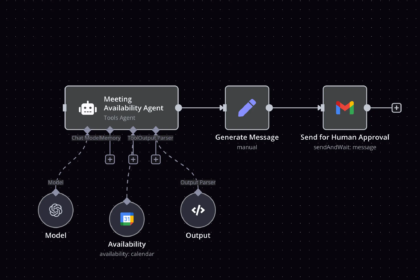
The power-user favorite. It’s a visual workflow builder that doesn’t lock you into preset paths, so it bends around weird real-world requirements better than anything else I’ve used. There’s a self-hosted free version if you’re cost-conscious and don’t mind a slightly steeper start.
Zapier
If “plug-and-play” is your priority, Zapier is hard to beat. You probably already use it for automation, and its AI agent features let you layer reasoning on top of the integrations you know.
Relevance AI and Make
Both sit in the middle — more customization and control than the beginner tools, without dropping you into code. Good “graduation” platforms once you’ve built your first agent and want more flexibility.
Voiceflow, Botpress, and Stack AI
Stronger picks if your agent is conversation-heavy (support bots, client-facing assistants) or you need enterprise-grade compliance like SOC 2 or GDPR down the line.
My honest advice: don’t overthink the choice. Pick one beginner-friendly tool, build something small, and switch later if you outgrow it. The skills transfer between platforms.
How to Build Your First AI Agent Without Coding: Step-by-Step
This is the part you came for. Here’s the exact process I use, and it works on almost any no-code platform.
Step 1: Define one clear job
Resist the urge to build a do-everything agent. Pick a single, repetitive task you do often. “Reply to refund requests” beats “run my whole business.”
Write it as one sentence: “This agent reads incoming support emails and drafts a reply using our return policy.” That sentence becomes your north star.
Step 2: Choose your platform and create an agent
Sign up for one of the tools above. Most have a free tier, so don’t pay yet. Click “create agent” (or the equivalent) and give it a name that matches its job.
Step 3: Write the instructions
This is where beginners win or lose. Treat the instruction box like onboarding a new assistant. Be specific:
- What’s its role? (“You are a friendly customer support assistant for an online clothing store.”)
- What should it do? (“Read each email, find the relevant policy, and draft a warm, clear reply.”)
- What should it never do? (“Never promise refunds over $200 — flag those for a human.”)
Clear boundaries make the agent reliable. Vague instructions make it go rogue.
Step 4: Add a knowledge base
Upload the documents the agent needs — your FAQ, policies, product list, or notes. The agent will pull answers from these instead of guessing. This single step dramatically improves accuracy.
Step 5: Connect your tools
Link the apps the agent needs to do its job: your email, a spreadsheet, your calendar, your CRM. On no-code platforms, this is usually a “connect account” button and a permission screen. No API keys to wrestle with for most beginner setups.
Step 6: Test before you trust
Run the agent on real examples and watch what it does. Feed it three or four messages and check every response. You’re looking for tone, accuracy, and whether it respects your boundaries.
When it gets something wrong, you don’t debug code — you just tighten the instructions and try again. That feedback loop is the whole skill.
Step 7: Deploy and keep a human in the loop
Once it’s reliable, turn it on. For anything customer-facing or money-related, set it to draft responses for your approval first, rather than sending automatically. Trust is earned. Give the agent a week of supervised runs before you let it act solo.
That’s it. Seven steps, zero code, one working agent.
Common Mistakes Beginners Make (And How to Skip Them)
I’ve made most of these so you don’t have to.
Building too big, too soon. A bloated agent that tries to do ten jobs does all of them poorly. Start with one.
Skipping the knowledge base. Without your documents, the agent invents answers. Always feed it real information.
Writing lazy instructions. “Help customers” is not an instruction. “Reply to billing questions using the pricing doc, in a calm tone, and escalate disputes” is.
Going fully automatic on day one. Let it draft before it sends. A bad automated reply at scale is worse than no agent at all.
Never reviewing performance. Check in weekly for the first month. Agents drift, your business changes, and small tweaks keep things sharp.
How to Turn Your AI Agents Into Income
Here’s where it gets interesting, because this skill pays.
Once you can build a working agent in an afternoon, you’re holding something most small businesses desperately want and can’t do themselves. A few realistic paths:
- Build agents for local businesses — support bots, booking assistants, lead handlers. Charge a setup fee plus monthly maintenance.
- Sell agent templates — package a “real estate lead agent” or “restaurant booking agent” others can plug in.
- Automate your own side hustle — let an agent handle the repetitive work so you can scale without hiring.
- Offer it as a service — agencies are charging real money for exactly the setup you just learned.
The barrier to entry is low right now. That’s exactly why moving early matters.
Frequently Asked Questions
Do I really need zero coding experience to build AI agents in 2026?
Yes, genuinely. Modern no-code platforms handle the technical infrastructure for you. You configure agents through visual builders and plain-English instructions. The hard part isn’t code — it’s thinking clearly about what you want the agent to do.
How much does it cost to build an AI agent without coding?
You can start free. Most platforms offer a free tier that’s enough to build and test your first agent. Paid plans typically run from around $20–$50 per month for basic use, scaling to $200+ for advanced or enterprise features. Self-hosted open-source options like n8n can be free if you’re comfortable setting them up.
How long does it take to build my first agent?
A simple, single-task agent can be live in under an hour once you’ve signed up. More complex agents with multiple tool connections and careful testing might take a weekend. The setup is fast — refining it for reliability is where you’ll spend the real time.
Are no-code AI agents reliable enough for real business use?
Increasingly, yes. Non-technical consultants are deploying production agents for support, onboarding, and internal workflows in 2026. The key is keeping a human in the loop for sensitive tasks and feeding the agent a solid knowledge base. Treat it like a capable assistant, not a fully autonomous employee, and it’ll serve you well.
Which no-code platform should a complete beginner start with?
Start with a beginner-focused tool like Lindy or Zapier if you want the gentlest learning curve, or n8n if you want maximum flexibility and don’t mind a slightly steeper start. Don’t agonize over the choice — your skills transfer between platforms, so picking one and building beats endless comparison.
Is it safe to connect my email and other accounts to an AI agent?
It can be, as long as you use reputable platforms and review their permissions. Look for tools with recognized compliance standards (SOC 2, GDPR) if you handle customer data. Start with limited permissions, keep agents in draft mode for sensitive actions, and only expand access once you trust the setup.
What’s the difference between an AI agent and a chatbot?
A chatbot responds to messages and stops there. An AI agent takes a goal, breaks it into steps, uses connected tools, and completes a task on its own. Think of a chatbot as a receptionist and an agent as an assistant who actually gets the work done.
Your Move
The gap between “people who can build AI agents” and “people who can’t” is about to become a real advantage — and right now, that gap is closing in your favor. You don’t need a computer science degree. You need one clear task, one no-code platform, and an afternoon.
So pick the single most repetitive thing you do this week. Open a free account on one of the tools above. Write your instructions like you’re training a new hire, test it on a few real examples, and watch it work.
The best way to learn to build AI agents without coding in 2026 isn’t reading another guide — it’s shipping your first one today. Start small, stay curious, and let your agent do the boring part while you build the next one.